Run Ten Features Without Chaos
Starting ten features is one loop. Keeping track of them is the hard part. In this tutorial you cap how many agents run at once, queue ten small features, then use the fleet tools to see what needs you, approve in a batch, retry what failed and pause new work.
Time: about 15 minutes of your own steps. You need: Shep set up in a repository, as in From zero to a merged PR.
Set a parallel limit and your defaults
shep settings workflow --push --pr --max-parallel 3At most three features now run an agent at the same time; the rest wait in a queue. --push --pr makes every new feature push its branch and open a draft PR, so you don’t have to pass the flags ten times.
You should see Running at most 3 features in parallel. Check everything with shep settings show.
Queue ten features
Pick ten small, independent changes for your repository. For example:
for task in \
  "add a 404 page" \
  "fix the broken footer link" \
  "add a dark mode toggle to the header" \
  "add alt text to every product image" \
  "show a spinner while the cart loads" \
  "add a /health endpoint that returns uptime" \
  "add a sitemap.xml" \
  "rename the 'Buy' button to 'Add to cart'" \
  "add a copyright line to the footer" \
  "log every request with its duration"
do
  shep feat new "$task"
done
You should see ten ✓ Feature created blocks. The first three say Status: Implementation; the other seven say Status: Pending, because they are queued. Run shep feat ls to see all ten.
Each feature gets its own branch and worktree, so the ten agents never touch each other’s files or your checkout.
See the whole fleet
shep fleet status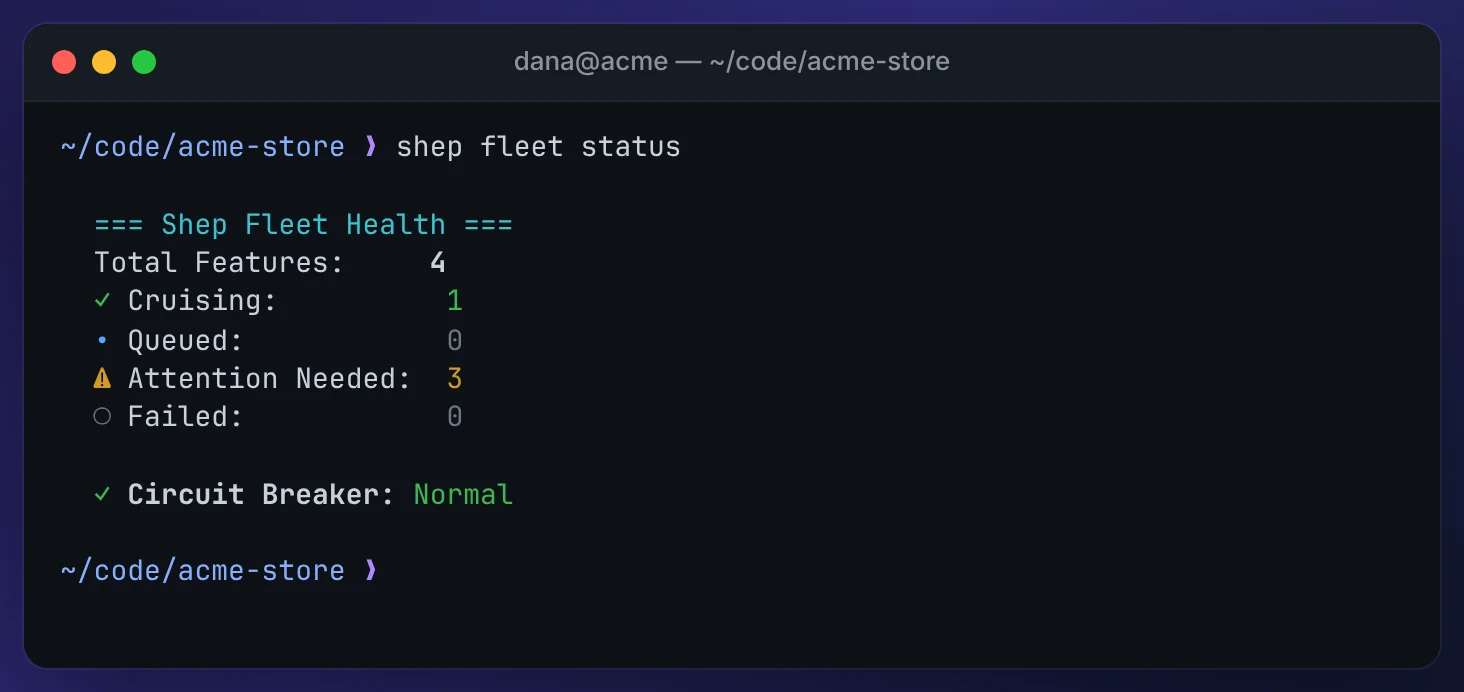
- Cruising: working without you.
- Queued: waiting for a free slot. They start on their own, oldest first.
- Attention needed: waiting for you, at a gate or with a question.
- Failed: runs that stopped with an error.
The web UI shows the same counts in the Control Center header:

For a live view in your terminal, run shep tui. Features that need you are pinned at the top. See A terminal-only workflow with tmux.
You should see the numbers move as features finish: as one leaves its slot, a queued one starts.
Triage what needs you
shep fleet triage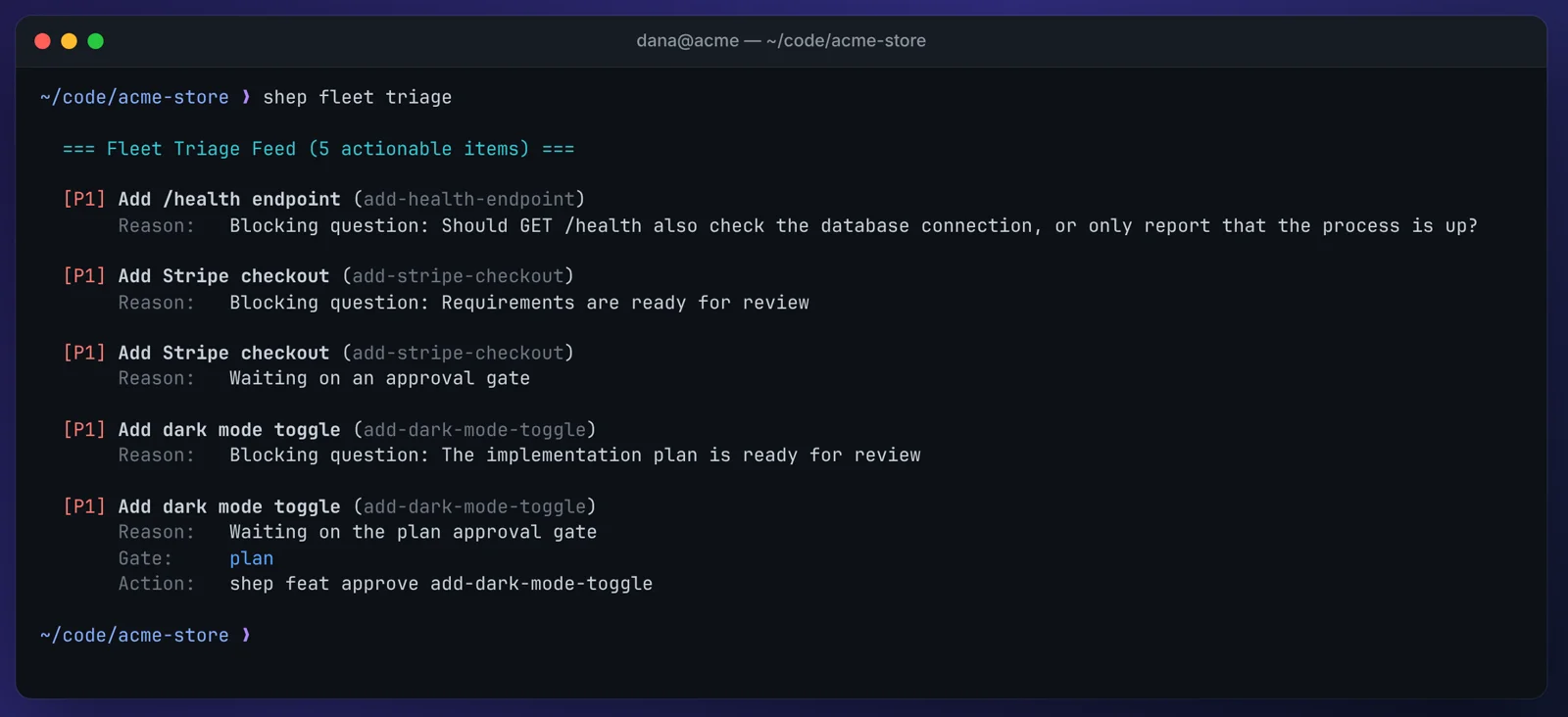
Triage lists only exceptions, by priority:
[P1]needs a decision: an approval gate, a blocking agent question, a merge conflict.[P2]needs a retry or a look: a failed run, CI that used up its fixes.[P3]is a warning, such as an agent that has been running for a long time.
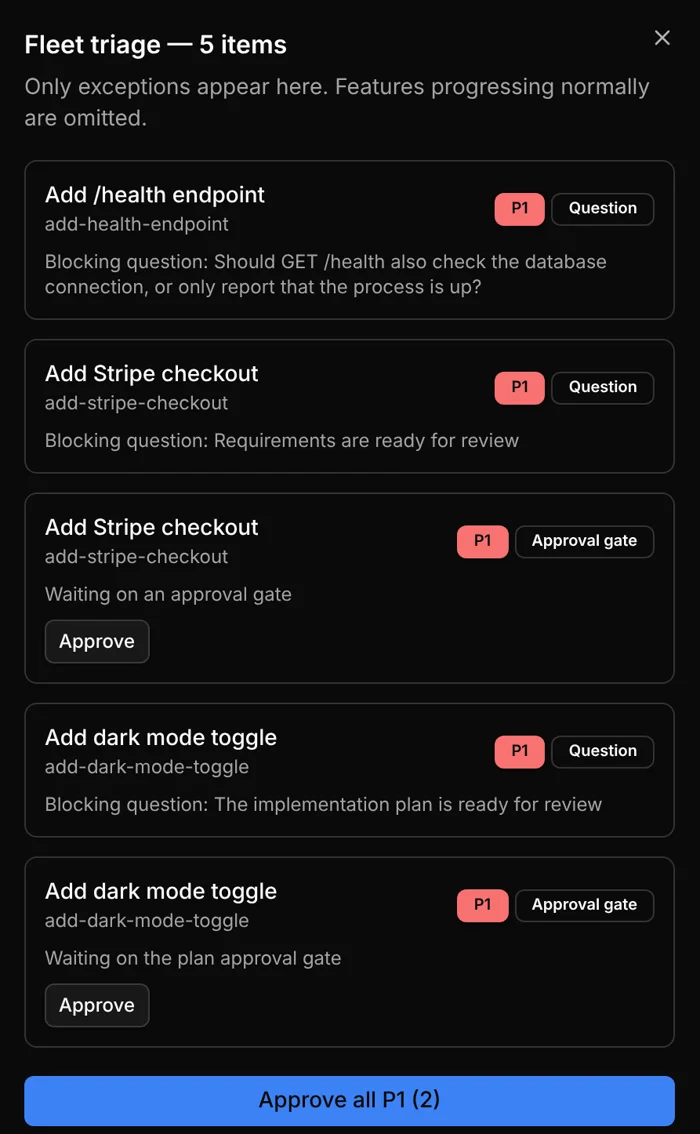
In the browser, click Triage in the fleet status bar. The drawer has the same list, with Approve on gates and Retry on failed runs:
Answer questions where they’re asked: in the feature drawer, the Agent Questions page, or with the command shep feat status <id> prints. See Decisions & agent questions.
Approve in a batch
Your ten features run in fast mode, so each one stops at the merge gate once its PR is ready. Review the PRs first. Then approve one at a time:
shep feat approve <id>Or every feature waiting at the merge gate at once:
shep fleet approve --gate mergeApproving a merge gate merges that feature’s PR. shep fleet approve always needs a scope: --gate prd, --gate plan, --gate merge, --all, or --low-risk, which approves only what your guardrail rules prove safe.
You should see ✓ Batch approved N of N candidate features. and the merged features leave the triage list.
Retry what failed
Look at why a run failed before you retry it:
shep feat status <id>
shep feat logs <id>
Then restart every failed, crashed or stopped run:
shep fleet retry --failedYou should see each restarted feature listed. The command exits with code 1 if any of them couldn’t be restarted, and says why.
Pause new work
Say CI is down and you don’t want more agents opening PRs right now:
shep fleet pause --reason "CI outage"You should see ✓ Fleet admission queue paused. Agents that are already running carry on; queued features stay queued and keep their place. shep fleet status now shows Admission Queue: PAUSED with your reason, the web status bar shows queue paused with a Resume button, and shep tui shows a banner.
When CI is back:
shep fleet resumeYou should see ✓ Fleet admission queue resumed. Queued features start again as slots free up.
Clean up
Remove the limit, or keep it if it suits you:
shep settings workflow --max-parallel 0 # 0 = no limit, the defaultDelete features you don’t want to keep with shep feat del <id>. It asks first, then removes the worktree and the branches and closes the PR.
Troubleshooting
- Queued features never start. Check
shep fleet statusforAdmission Queue: PAUSEDand runshep fleet resume. To start one feature right away, ignoring the limit, runshep feat start <id> --force. Circuit Breaker: TRIPPED. Several runs failed in a row. Shep reports this but doesn’t stop anything. Runshep fleet triageto find the common cause, andshep fleet pausewhile you fix it.shep fleet resumealso resets the breaker’s count.- The triage
Action:line doesn’t work. It suggestsshep feat approvewith the feature’s slug. If Shep answersFeature not found, use the id or an id prefix fromshep feat lsinstead. - Two features changed the same file. They can’t clash while they run, because each has its own worktree, but their PRs can still conflict when you merge them. A merge conflict shows up in triage as
[P1].
What’s next
- Running many features: the queue, parent features, the circuit breaker in detail.
- Supervisor & guardrails: rules that let
--low-riskapprove for you. - A terminal-only workflow with tmux: watch the fleet from
shep tui.