Software Factory
New in v1.236 (October 2026). Every part of this section is behind its own feature flag. All of them are on by default, and none of them changes how a plain shep feat new run behaves until you configure it. The commands and pages are still young, so expect them to change.
Most of Shep is about running agents on features: one worktree, one branch, one pull request per feature. The software factory is the set of tools around those runs. It answers the questions that come before and after a feature:
- Which logins and which knowledge does this repository get? → Spaces
- Where does the work come from? → Trackers and team knowledge, Projects and the bug loop, Opportunities
- What broke in production? → Incidents
- Did the shipped work help, and what can run without someone starting it? → Opportunities, Docs first and autopilot
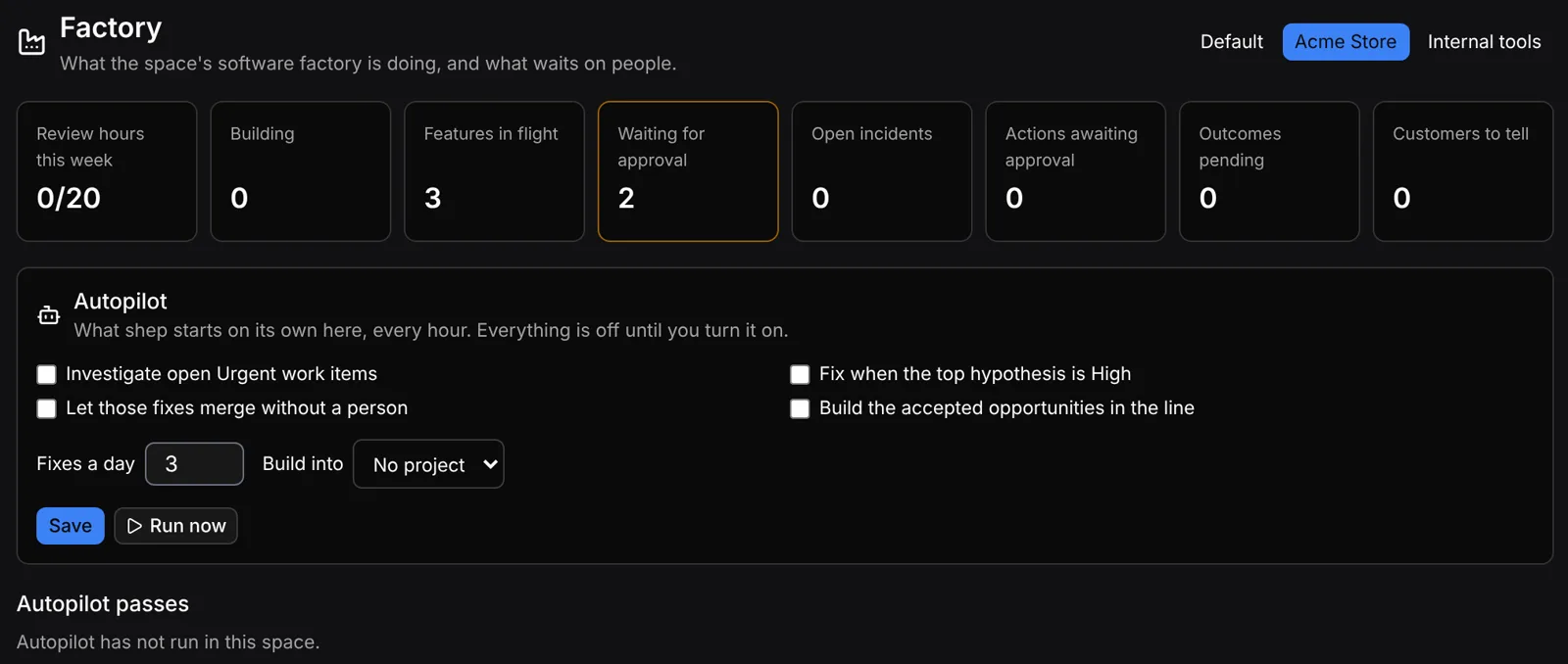
The Factory page (/factory) shows one space at a glance. See Factory status.
Everything runs on your machine, in the same Shep daemon and SQLite database as the rest of Shep. Background work (tracker sync, knowledge sync, scheduled discovery, outcome checks, autopilot) runs while the daemon is up (shep start, or shep ui in the foreground).
Spaces come first
A space is a wall around a body of work: a client, an employer, your side projects. Each repository belongs to exactly one space, placed there by a rule (a folder or a git remote pattern) or pinned by hand. A fresh install has one space called Default, so nothing changes until you add another.
Almost everything else in this section belongs to a space: project memory, tracker and Notion connections, signals, opportunities, feedback keys, incidents and the autopilot policy. A space can also set which Claude and GitHub logins, git identity and agents its feature runs use. Start with Spaces.
The loop
  customer feedback ─┐   (POST /api/feedback)
  incidents ─────────┤   (shep incident, POST /api/alerts)
  your own notes ────┼──▶ SIGNALS ──▶ themes ─┐
  discovery agent ───┘                        ▼
                                        OPPORTUNITIES  scored by value per review hour,
                                              │        cut at the week's review capacity ("the line")
                                              ▼ build
  Linear / Jira ◀──sync──▶ PROJECTS ──▶ WORK ITEMS ──▶ bug loop: investigate → hypotheses → fix
                                              │
                                              ▼
                                         FEATURES  (ordinary Shep feature runs: worktree, gates, CI, PR)
                                              │
                                              ▼ work item done
OUTCOMES similar reports before vs. after shipping| Step | What it is | Where |
|---|---|---|
| Signal | One piece of evidence: a customer request, an incident, a note. Can name a customer, monthly revenue at stake, and urgency | shep signal, /opportunities |
| Theme | Unlinked signals that share enough words | shep feedback themes |
| Opportunity | A bet: estimated review hours, confidence, strategic or not. Ranked by value per review hour | shep opportunity, /opportunities |
| Work item | A unit of work in a Shep project, typed in Shep or synced from Linear/Jira | shep item, /projects |
| Investigation | An agent reads a read-only copy of the repository and ranks root causes for a bug | shep item investigate |
| Feature | A normal Shep feature run, created from a hypothesis or by hand | shep feat |
| Outcome | Fourteen days after shipping, Shep compares similar signals before and after | shep outcome |
| Incident | A production problem with a timeline, agent triage and Kubernetes actions you approve | shep incident, /incidents |
People decide at each arrow: you accept or drop opportunities, pick which hypothesis to fix, approve runtime actions, and the usual approval gates apply to every feature. Autopilot can take over a few of those steps per space — investigating urgent bugs, starting fixes for high-confidence hypotheses, and building accepted opportunities — but only the ones you turn on. It is off for every space until you configure it.
Feature flags
Each area has its own flag. Turning a flag off hides its sidebar link and page, hides its shep command group (running it prints how to turn the flag back on), and stops its background work on the next pass. It never deletes data.
| Flag | Gates |
|---|---|
spaces | /spaces, shep space |
trackers | Linear and Jira: /connections, shep connection, shep sync, scheduled tracker sync |
knowledge | Notion team knowledge: /connections, shep connection, shep knowledge, scheduled knowledge sync |
signals | shep signal; the signal form and Signals to link on /opportunities |
opportunities | /opportunities, shep opportunity |
feedback | POST /api/feedback, shep feedback; themes and feedback keys on /opportunities |
discovery | shep discovery, scheduled discovery runs, the Discovery panel |
incidents | /incidents, POST /api/alerts, shep incident, the incident setting on a space |
outcomes | shep outcome, the hourly outcome check, the Outcomes panel |
docsFirst | Docs-first instructions and the docs merge gate in spaces that ask for them |
autopilot | shep autopilot, hourly autopilot passes, the Autopilot form on /factory |
factory | /factory, shep factory |
Projects and work items (/projects, shep project, shep item, shep cycle) predate this section and sit under the projects flag in the Platform group.
List the flags and their state:
shep settings flagsOr open Settings → Feature flags in the web UI, where these twelve are listed under Software factory. See Feature flags for the full list.
Turning the whole section off
There is no single switch; disable the twelve flags:
for flag in spaces trackers knowledge signals opportunities feedback discovery \
            incidents outcomes docsFirst autopilot factory; do
  shep settings flags disable "$flag"
done
Two things keep working after that, by design:
- Spaces you already configured still apply to runs. A space’s Claude/GitHub config directories, git identity and allowed agents are applied to every feature run in its repositories whether or not the
spacesflag is on, and project memory stays split by space. To stop that, clear the settings first:shep space config <space> --clear claude-config-dir gh-config-dir git-name git-email agents. - Synced Notion documents already stored for a space are still offered to agents. Remove the sources first (
shep knowledge source rm <source>) if you don’t want that.
Turning docsFirst off does stop the docs-first instructions and the docs merge gate immediately.
Pages in this section
- Spaces and product lines — where repositories land, per-space logins, git identity and agent rules
- Trackers and team knowledge — Linear/Jira sync and Notion pages as agent context
- Projects and the bug loop — work items, cycles, and investigate → hypotheses → test-first fix
- Opportunities, feedback and outcomes — signals, scoring, the weekly line, feedback intake, discovery, outcomes
- Incidents — open, triage, restart/roll back/scale with approval, postmortem
- Docs first and autopilot — documentation before code, what a space may start on its own, factory status
See also
- Feature flags
- How Shep works
- PR comments — a space also decides which review comments Shep answers