Opportunities, Feedback and Outcomes
New. Five feature flags, all on by default: signals, opportunities, feedback, discovery and outcomes. Turn any of them off in Settings → Feature flags or with shep settings flags disable <flag>; the matching command group and panel on the Opportunities page disappear.
Agents can produce more changes than a team can review. The scarce resource is the people who read and merge the result. The Opportunities page (/opportunities) and the shep signal, shep opportunity, shep feedback, shep discovery and shep outcome commands help you spend review time on the work worth most, then check whether it helped.
Everything here belongs to a space. Each command takes -s, --space <space> and uses the default space without it. On the page, pick the space at the top right.
Signals
A signal is one piece of evidence that users need something. It can name the customer behind it, the revenue per month at stake for that customer, and whether it is urgent.
shep signal add "Guest checkout times out" --space acme \
  --kind feedback --customer Globex --revenue 4000 --urgent \
  --url https://support.acme.com/t/812
shep signal ls --space acme --unlinked| Option | Meaning |
|---|---|
-k, --kind | feedback, incident, tracker, discovery or manual (default) |
-c, --customer | Customer or account behind it |
-r, --revenue | Revenue at stake per month for that customer |
-u, --urgent | Needs attention soon |
--url, -d, --detail | Link to the original, longer text |
-l, --product-line | Product line it concerns |
-o, --opportunity | Opportunity to link it to |
Signals also arrive on their own: every feedback post becomes a Feedback signal, and every incident becomes an Incident signal (urgent for Critical and Major). shep signal rm <signal> removes one.
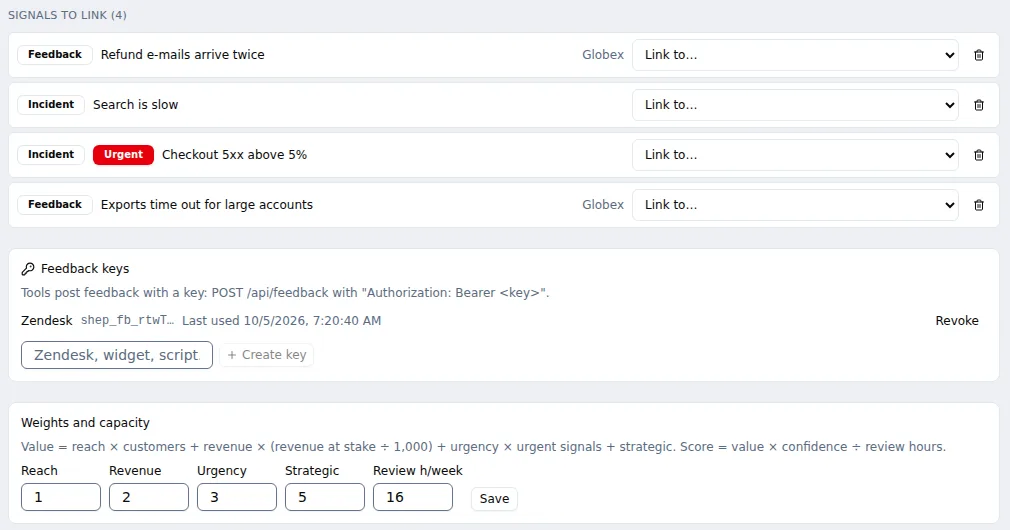
On the page, record signals with the form above Signals to link, the list of signals not yet supporting an opportunity.
Opportunities
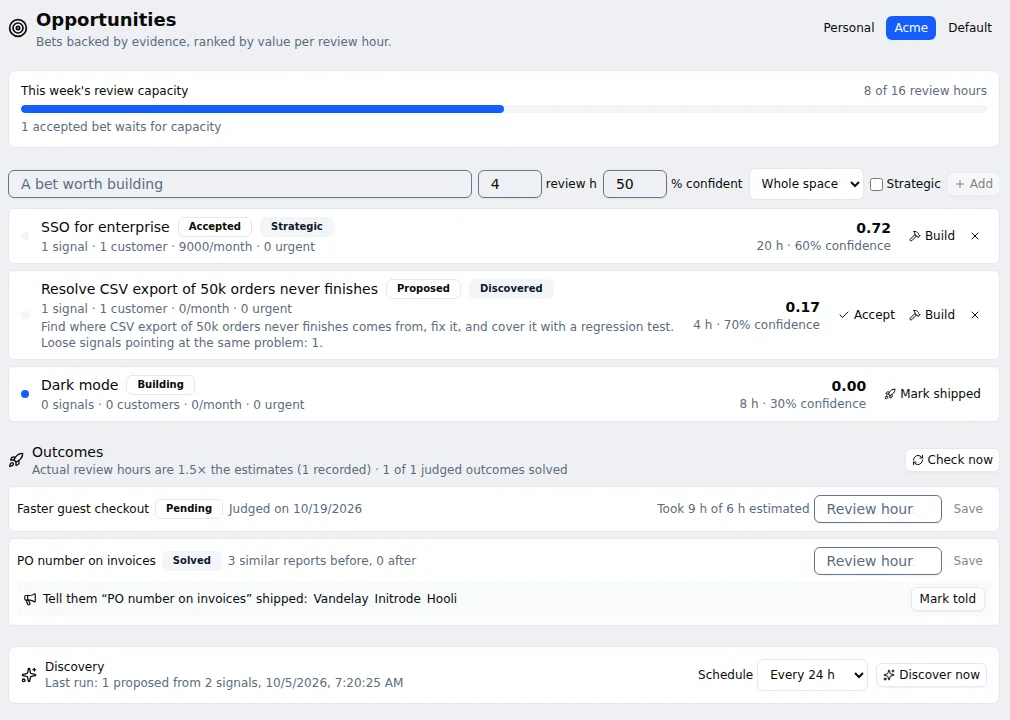
An opportunity is a bet worth building. It carries an estimate in review hours (how long people will spend reviewing and merging it), a confidence from 0 to 1 (default 0.5), and can be marked strategic.
shep opportunity add "Faster guest checkout" --hours 6 --confidence 0.7 --space acme \
  --problem "Guests abandon checkout when it times out"
shep opportunity link <signal-id> <opportunity-id>
The score
value = reach × customers + revenue × (revenue at stake ÷ 1,000) + urgency × urgent signals + strategic
score = value × confidence ÷ review hours- customers: distinct customers named by the linked signals (a signal with no customer counts as one).
- revenue at stake: per customer, the largest monthly amount any signal named, summed.
- strategic: added once if the opportunity is strategic.
The score is value per review hour. Each space has its own weights and weekly review capacity. Defaults: reach 1, revenue 2, urgency 3, strategic 5, and 20 review hours a week.
shep opportunity weights --space acme                         # show
shep opportunity weights --space acme --urgency 5 --capacity 12
The line
shep opportunity ls and the page rank open opportunities by score and mark the line (▶ in the terminal, In this week’s line on the page): opportunities already building hold their hours first, then accepted ones join best-first while their hours fit the week’s capacity. The rest wait. The capacity bar shows how full the week is.
Decide
shep opportunity accept <opportunity>                        # competes for capacity
shep opportunity drop <opportunity> --reason "Covered by the new PSP"
shep opportunity build <opportunity> --project payments      # becomes a work item
Build creates a work item in the project. Its description carries the problem, the numbers behind the decision and up to ten signals, so the agents that later plan and build it know why it matters. The opportunity moves to Building. A dropped opportunity can be accepted again.
Statuses: Proposed → Accepted → Building → Shipped, or Dropped.
| Command | Does |
|---|---|
shep opportunity add <title> -h <hours> [-c <0-1>] [--strategic] [-p <problem>] [-s <space>] [-l <line>] | Shape a new opportunity |
shep opportunity ls [-s <space>] | Rank open opportunities and mark the line |
shep opportunity show <opportunity> | Evidence and score |
shep opportunity estimate <opportunity> [-h] [-c] [--strategic] [-p] | Change the estimate, confidence or problem |
shep opportunity link <signal> <opportunity> / unlink <signal> | Link or unlink evidence (same space only) |
shep opportunity accept <opportunity> | Accept it |
shep opportunity drop <opportunity> -r <reason> | Drop it, saying why |
shep opportunity build <opportunity> -p <project> | Turn it into a work item |
shep opportunity weights [-s] [--reach] [--revenue] [--urgency] [--strategic] [--capacity] | Show or set weights and weekly review hours |
Feedback intake
A support tool, feedback widget or script can post customer feedback into a space. Each post becomes a Feedback signal.
1. Create a key
shep feedback key create --space acme --name ZendeskShep prints the key (shep_fb_…) once. Copy it into the tool now; Shep keeps only a hash and the first characters. On the page, Feedback keys creates keys the same way and shows when each was last used.
| Command | Does |
|---|---|
shep feedback key create -n <name> [-s <space>] | Create a key for one tool |
shep feedback key ls [-s <space>] | List keys |
shep feedback key revoke <key-id> | Revoke a key; posts with it are refused |
A key is a bearer secret: anyone holding it can post into that space. The same key can also open incidents through POST /api/alerts (Incidents).
2. Post feedback
curl -X POST http://localhost:4050/api/feedback \
  -H "Authorization: Bearer shep_fb_…" \
  -H "Content-Type: application/json" \
  -d '{
        "text": "Guest checkout times out\nHappens on mobile since Tuesday.",
        "customer": "Globex",
        "monthlyRevenue": 4000,
        "url": "https://support.acme.com/tickets/812",
        "urgent": true,
        "externalId": "zendesk-812"
}'| Field | Required | Meaning |
|---|---|---|
text | yes | The feedback. Its first line becomes the signal’s title, the rest its detail |
detail | no | More text, added after the rest of text |
customer | no | The customer or account |
monthlyRevenue | no | Revenue at stake per month, 0 or more |
url | no | An http(s) link to the original |
urgent | no | true when it needs attention soon |
externalId | no | Your tool’s id. Posting the same id again returns the signal already recorded |
Responses: 201 recorded, 200 already recorded (same externalId), 400 bad payload, 401 unknown or revoked key, 413 body over 16 KB. The body is { "id": "<signal id>", "duplicate": false }.
The Shep web server listens on your machine (port 4050 unless you chose another). A script on the same machine can post to localhost. A hosted tool needs a tunnel or reverse proxy you set up; this endpoint checks the feedback key itself, so it does not need Shep’s session token.
3. Themes and promotion
shep feedback themes --space acme
shep feedback promote <theme-key> --hours 6 --title "Faster guest checkout"
Unlinked signals that share enough words form a theme, labelled by its most common words, with the customers, revenue and urgent signals behind it. Promote creates a Proposed opportunity (titled by the theme’s words unless you pass --title) and links every signal of the theme to it. promote also takes -c <0-1> for confidence.
Themes are computed from shared words, not meaning: two requests phrased very differently stay apart.
Discovery
Discovery hands a space’s loose evidence to an agent and gets back a few proposed opportunities, each tied to the signals behind it.
shep discovery run --space acmeOr press Discover now on the page. The agent reads the space’s newest 60 unlinked signals, the themes among them, the titles of the space’s open opportunities (so it doesn’t repeat them) and the titles of the space’s team knowledge documents. It gets no tools and sees nothing outside the space.
It answers with up to five proposals: title, problem, an outline of what to build, why now, a review-hour estimate, a confidence and the signals it rests on. Shep keeps a proposal only if it cites signals that really are unlinked in this space and its title is new. Kept proposals become Proposed opportunities marked Discovered, with their signals linked. They rank like any other; you still accept or drop them.
shep discovery schedule --space acme --every 24     # every 24 hours (1 to 720)
shep discovery schedule --space acme --off
shep discovery ls --space acme                       # past runs
Discovery is off until you schedule it. The daemon starts due runs. Each run records how many signals it read, how many opportunities it proposed and dropped, and why it failed if it did. One run per space at a time.
The run uses the space’s agent rules: a space limited to some agents uses the first of them unless --agent names another allowed one, and the space’s logins apply.
Outcomes
When the work item behind a Building opportunity reaches a completed state, Shep marks the opportunity Shipped within the hour. If the work item is cancelled, the opportunity goes back to Accepted. Mark work done outside a work item as shipped by hand:
shep outcome ship <opportunity> # or Mark shipped on the pageFourteen days after shipping, Shep counts the space’s signals that look like the opportunity — linked to it, or sharing enough words with its title, problem or linked signals — in the 14 days before and the 14 days after shipping. Half as many after, or fewer, is Solved. More is Persisting, a sign the bet missed.
shep outcome ls --space acme              # verdicts, before → after, customers to tell
shep outcome check                        # ship finished work and judge due outcomes now
shep outcome tell <opportunity>           # the customers behind it and a note to send
shep outcome tell <opportunity> --done    # mark them told
shep outcome hours <opportunity> 9        # the review hours it really took
The Outcomes panel on the page shows the same, with Mark told and a review-hours field. Its first line is the space’s calibration: actual review hours against the estimates, and how many judged outcomes were solved. If your bets take 1.5× the hours you estimate, estimate bigger.

See also
- Spaces
- Projects and the bug loop — where built opportunities land
- Docs first and autopilot — autopilot can build the line for you
- Incidents