Git Checkpoints
After each agent step that can change files, Shep takes a snapshot of the feature’s worktree. You can then see exactly what one step changed, compare any two steps, and roll the worktree back to an earlier step if a later one went the wrong way.
Checkpoints are automatic. There’s nothing to turn on.
What gets a checkpoint
| Workflow | Steps that record a checkpoint |
|---|---|
| Spec-driven | analyze, requirements, research, plan, implement, the repair steps, merge |
| Fast (the default) | fast-implement, merge |
| Exploration | prototype-generate |
- The first time one of these steps runs for a feature, Shep records a baseline of the worktree as it was before any agent touched it.
- A checkpoint is recorded after the step even if the step failed or stopped at an approval gate, so partial work is kept.
- If a step changed nothing, no checkpoint is recorded for it.
- Steps that only read files (validation, memory extraction) don’t record one.
- Recording a checkpoint never fails a run. If a snapshot can’t be taken, the agent log says so and the run carries on.
Each checkpoint is labelled with a sequence number and the step, for example 0000-baseline, 0001-analyze, 0003-implement, 0004-repair_research in spec-driven mode, or 0001-fast-implement in fast mode.
Where they live
Checkpoints are commits under a hidden ref in your repository:
refs/shep/checkpoints/<feature-id>/0000-baseline
refs/shep/checkpoints/<feature-id>/0001-analyze
refs/shep/checkpoints/<feature-id>/0003-implement- They are not branches or tags, so
git branchandgit logdon’t show them, andgit pushnever sends them. They stay on your machine. - Taking a snapshot doesn’t touch your branch,
HEAD, the index or the working tree. It includes tracked and untracked files, and skips whatever.gitignoreexcludes. - They are deleted when the feature’s worktree is cleaned up after merge, and when the feature is deleted or archived.
List a feature’s checkpoints
shep feat checkpoints <id>This prints each step with when it was taken, how many files it changed with lines added and removed, and its commit. <id> is a feature id or id prefix.
See what changed
shep feat diff <id> --to implement             # what the implement step changed
shep feat diff <id> --from plan --to merge     # everything between two steps
shep feat diff <id> --from 0 --to 5 --stat # only the list of changed files| Option | Meaning |
|---|---|
--to <step> | Required. The step to show |
--from <step> | The step to compare against. Default: the checkpoint just before --to, so you see what that one step changed |
--stat | Only list the changed files |
A step can be given three ways: a sequence number (3), a step name (implement, meaning that step’s latest checkpoint), or a label (0003-implement). Renames are detected.
Roll the worktree back
shep feat restore <id> plan              # back to the worktree after "plan"
shep feat restore <id> 0000-baseline -f  # back to the start, no prompt
Shep asks before restoring unless you pass -f / --force. A restore:
- Records a
pre-restorecheckpoint of the worktree as it is now. To undo the restore, restore that checkpoint; Shep prints the command. - Makes the worktree’s files match the chosen checkpoint. Ignored files such as
node_modulesand.envare kept.
The branch doesn’t move and no commits are rewritten. The rollback is an ordinary change in the worktree that the next step commits, so nothing already pushed is touched.
A restore is refused when:
- the agent is running (a run waiting at an approval gate is fine),
- the feature doesn’t run in its own worktree, or
- the worktree can’t be read, for example because it was removed.
In the web UI
Open a feature and pick the Checkpoints tab.
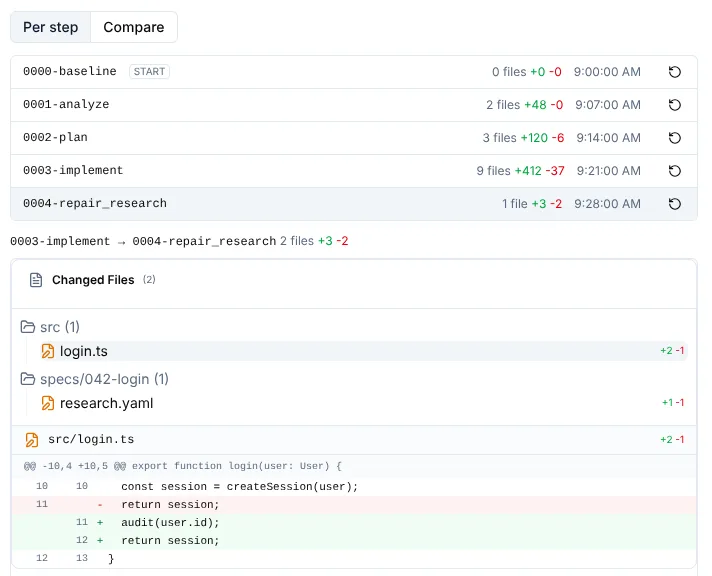
- Per step shows what the selected step changed.
- Compare adds From and To pickers to diff any two steps.
- The restore button on a row opens a confirmation: “The worktree’s files are replaced with this checkpoint. The current state is saved as a new checkpoint first, and the branch and its commits are not changed.” When a restore isn’t possible, the button is disabled and says why.