Running Many Features
Every Shep feature runs its own agent in its own worktree, so you can start many at once. This page covers the controls for doing that at scale: a limit on how many agents run in parallel, the queue behind it, features that wait for another feature, batch approvals and retries, and pausing the queue when things go wrong.
Limit how many agents run at once
By default there is no limit. To run at most three features at a time:
shep settings workflow --max-parallel 3Or set Max parallel features under Settings → Workflow. 0 means unlimited (the default); the highest value is 64.
The limit counts features whose agent is working: the analyze, requirements, research, planning, implementation and exploration phases. A feature stops holding a slot when its run finishes, fails or is stopped. Two cases keep their slot:
- A run waiting at an approval gate, because it resumes in place when you approve.
- A feature whose run is still starting.
Features waiting for review of a PR, or for CI, don’t hold a slot.
The queue
When the limit is reached, a new feature is created in the Pending lifecycle and queued. Queued features start automatically, oldest first, as slots free up. The web UI shows them as Queued · N ahead, shep feat status says “Queued until a slot under the parallel-feature limit frees up”, and shep feat start reports the position.
To start one anyway, bypassing the limit:
shep feat start <id> --force
shep feat resume <id> --force
A feature you created with shep feat new --pending is also Pending, but it is deferred, not queued: it never starts on its own. Start it with shep feat start <id>.
Features that wait for another feature
Create a feature with a parent when it builds on work that hasn’t landed yet:
shep feat new "Add billing history page" --parent <parent-id>--parent takes the parent’s id or an id prefix. While the parent’s work is unfinished, the child sits in the Blocked lifecycle (activity state waiting, reason “Waiting for its parent feature to finish”), and no agent runs for it.
The child is released when the parent is merged (lifecycle Maintain), or archived after it was merged. Shep then rebases the child’s branch (onto the base branch once the parent’s work has landed there) and starts its agent. The parallel limit still applies: a released child with no free slot is queued like any other feature. Only direct children are released; a grandchild waits for its own parent.
See the fleet
shep fleet status                    # the whole fleet
shep fleet status --repo ~/src/shop  # one repository
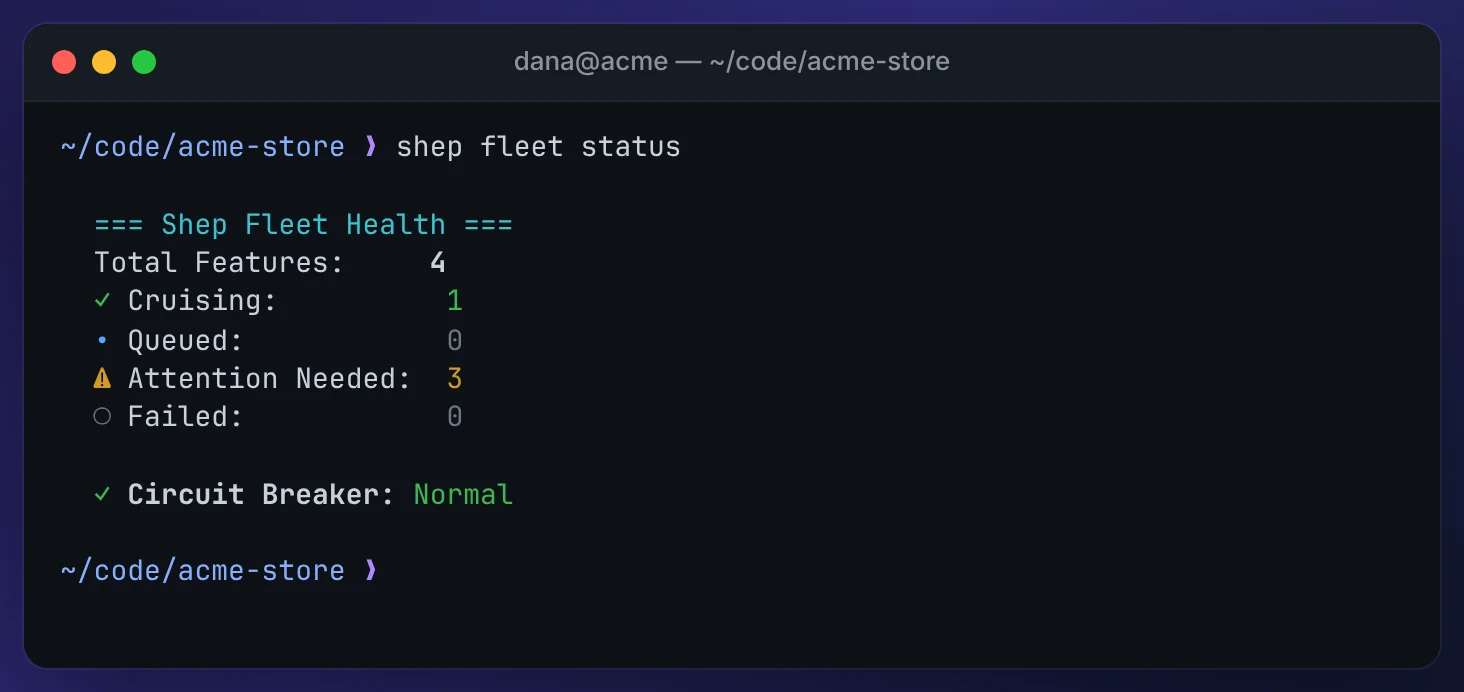
fleet status prints the total and how many features are cruising (working without you), queued, attention needed and failed, then whether the admission queue is paused and whether the circuit breaker has tripped.
shep fleet triage [--repo <path>]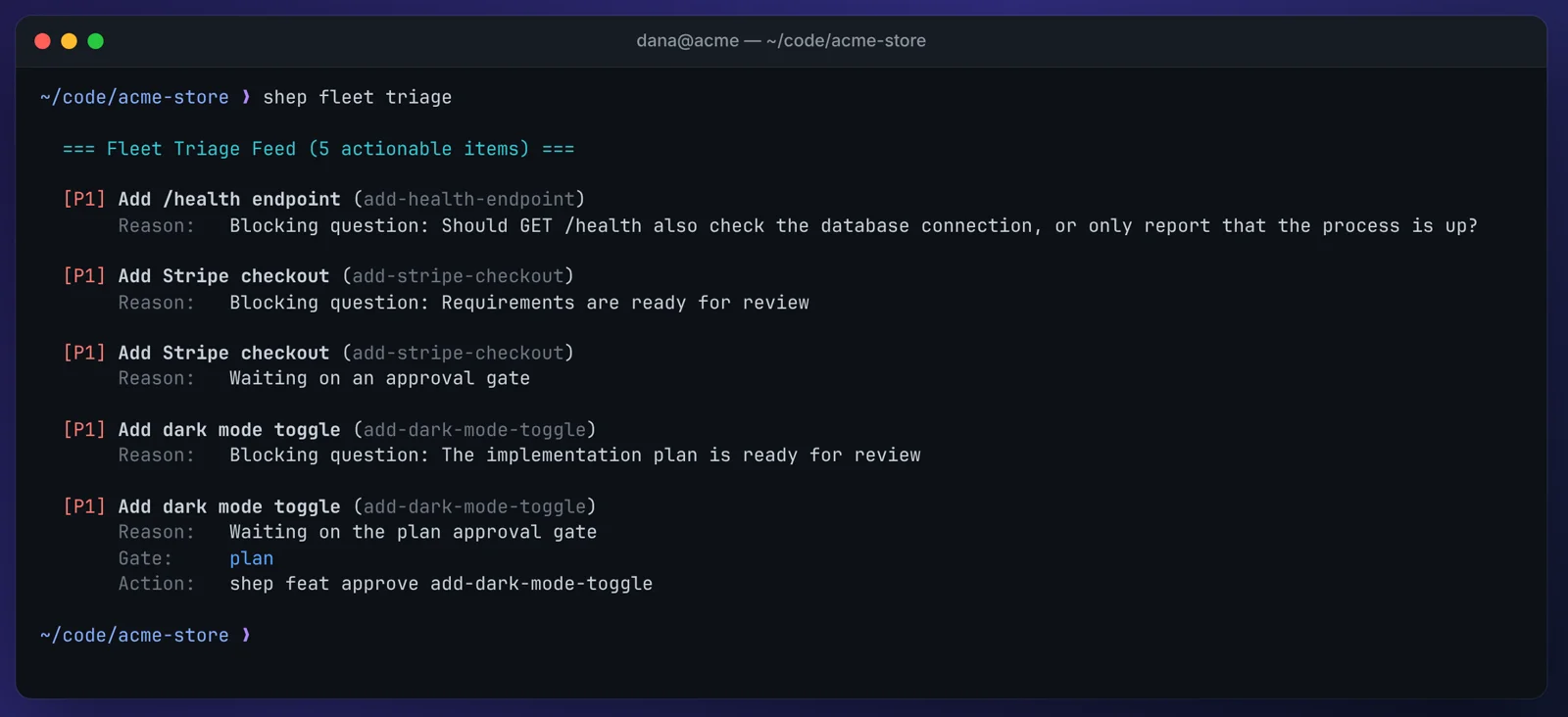
fleet triage lists what needs action, tagged by priority: [P1] for blockers that need a decision (gates, blocking questions, merge conflicts), [P2] for failures to act on or retry (failed runs, CI that exhausted its fixes), [P3] for warnings such as a stalled or long-running agent. Each item names the feature and the reason, and for gates which gate is waiting. Approve with shep feat approve <id> or in batches (below).
In the web UI
The Control Center header has a fleet status bar: counts for cruising, queued, need you and failed, a breaker tripped badge when the breaker has tripped, a queue paused badge with a Resume button when the queue is paused, and a Triage button.

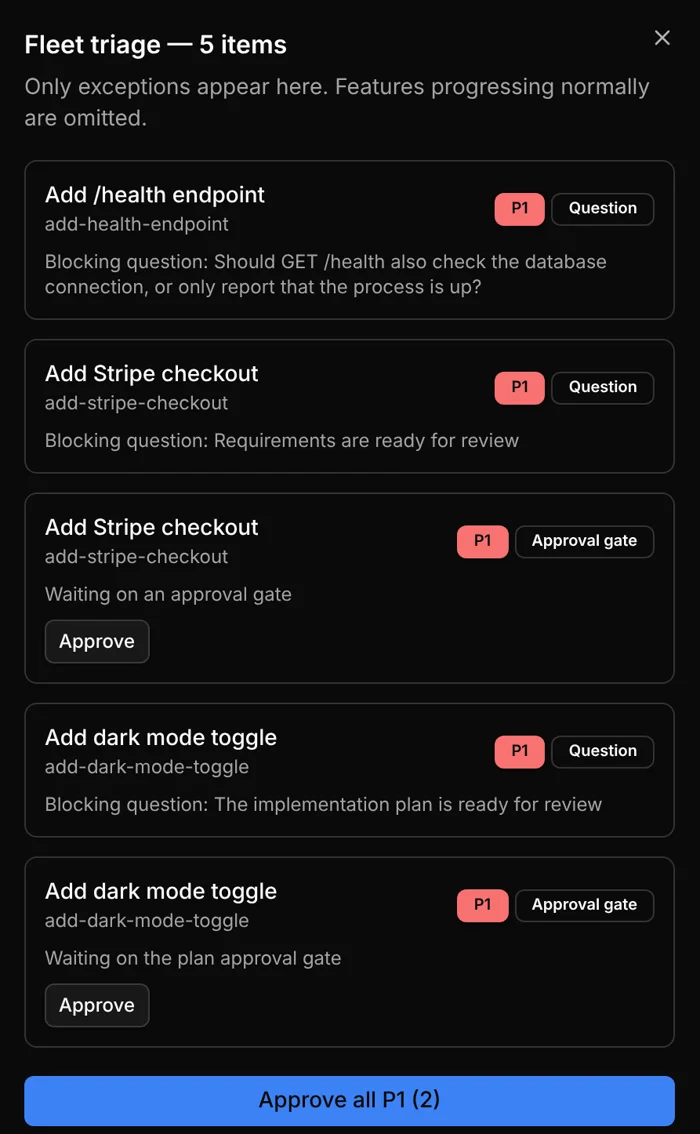
Triage opens a drawer with the same feed as shep fleet triage; each item can be opened, approved (gates) or retried (failed runs), and Approve all and Retry all act on the whole list.
In the terminal console, the header shows the same counts, a banner when the queue is paused, and breaker tripped when the breaker has tripped.
Approve in batches
shep fleet approve --gate plan     # every feature waiting at plan review
shep fleet approve --low-risk      # only what your guardrail rules prove safe
shep fleet approve --all           # every waiting gate
You must pick one of --all, --gate <prd|plan|merge> or --low-risk; Shep never batch-approves without being told the scope. Approving a merge gate merges that feature’s PR.
--low-risk approves a gate only when the feature’s supervisor policy is enabled, a guardrail rule covers that gate, every matching rule passes, and every matching rule allows automatic approval. Without rules, it approves nothing. If the diff or CI facts can’t be read, the gate is skipped. Gates it skips are listed with the reason, grouped:
✓ Batch approved 2 of 4 candidate features.

  ⚠ 2 features were left for a human:
    No guardrail rules configured for the plan gate — nothing is low-risk: 7a8252ce-…
    No guardrail rules configured — no supervisor policy exists for this scope, so nothing is low-risk: 4be1d2c0-…
The command exits with code 1 whenever anything it selected was not approved, so a script never mistakes a partial batch for a cleared fleet.
Retry failed runs
shep fleet retry --failed
shep fleet retry --failed --repo ~/src/shop
--failed is required, because restarting every failed run is never implicit. It resumes each run that failed, crashed or was stopped, through the same path as shep feat resume, and prints which ones restarted and which couldn’t. It exits with 1 if any could not be restarted. A run waiting at a gate is never touched; approve or reject it instead. In the web UI, use Retry in the triage drawer or the feature drawer.
Pause and resume the queue
shep fleet pause --reason "Release freeze"
shep fleet resume
While the queue is paused, no queued feature starts and no new feature is admitted, even with --force. Agents that are already running carry on, and work that doesn’t need a slot (for example, resuming a merge that failed in review) is still allowed. shep fleet status, the web status bar and the terminal console show the pause with its reason and how long it has lasted.
Resume with shep fleet resume, the Resume button in the fleet status bar, or u in the terminal console. Queued features then start as slots free up. Your parallel limit is untouched by a pause.
The circuit breaker
Shep watches agent runs fleet-wide and trips a circuit breaker when, within a rolling 15-minute window:
- the last 4 finished runs failed in a row, or
- more than 25% of finished runs failed, counting at least 4 runs.
Only runs that failed count. Runs you stopped, and runs interrupted by a daemon restart, don’t.
A trip is reported in shep fleet status (with the reason, for example “Consecutive failure threshold reached (4/4 runs failed in the last 15m)”), as the breaker tripped badge in the web UI, and in the terminal console header. It does not stop anything on its own. Look at what broke with shep fleet triage, and if you want to stop new work from starting while you investigate, pause the queue with shep fleet pause.
shep fleet resume also acknowledges the trip: from then on the breaker only counts runs that finish after that moment, so the same failures don’t trip it again. A new run of failures does.
What’s next
- Run ten features without chaos: a hands-on tutorial of this page.
- Supervisor & guardrails: the rules behind
--low-risk. - Terminal console: watch and steer the fleet from a terminal.
- Agent activity & states
- Parallel agents & worktrees