MCP Server
shep mcp runs a Model Context Protocol server over stdio. Register it with an MCP client (Claude Code, Cursor, Claude Desktop, VS Code, …) and that client’s agent can list and create features, start them, watch what Shep’s agents are doing, approve or reject gates, and answer agent questions.
The server works on the same local database as the rest of Shep (~/.shep, or $SHEP_HOME). Features it creates show up in the web UI, shep tui and shep feat ls like any other.
Register the server
Claude Code
claude mcp add shep -- shep mcpAny MCP client
Most clients take a JSON entry like this (Claude Desktop’s claude_desktop_config.json, Cursor’s mcp.json, and similar):
{
  "mcpServers": {
    "shep": {
      "command": "shep",
      "args": ["mcp"]
    }
  }
}
The client starts shep mcp itself; you don’t run it in a terminal. If the client can’t find shep, use the full path from which shep.
shep mcp --log-level <debug|info|warn|error> sets how much the server logs (default warn). Logs go to stderr, so they never mix with the protocol on stdout.
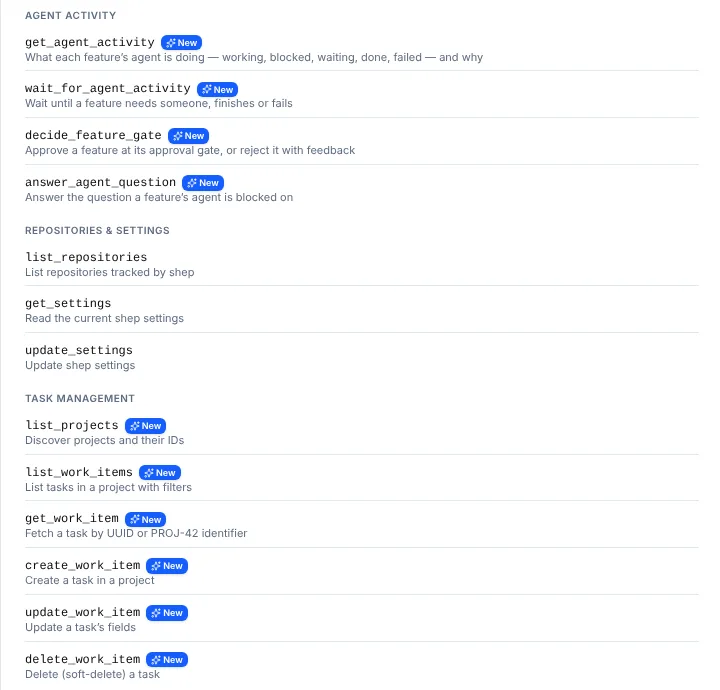
Settings → MCP in the web UI shows the command to register and the full tool list.
Tools
The server exposes 22 tools.
Features
| Tool | What it does |
|---|---|
list_features | List features, optionally filtered by lifecycle status (Pending, Implementation, Review, …) |
show_feature | One feature’s details. Takes a full id or an id prefix |
create_feature | Create a feature from a description (userInput) in a repository (repositoryPath). Optional name, description, and pending: true to create it without starting an agent. Uses your workflow defaults |
start_feature | Start a pending feature. Returns the run id right away |
Agent activity
| Tool | What it does |
|---|---|
get_agent_activity | What each feature’s agent is doing: working, blocked, waiting, done or failed, with the reason, any open question, and a version number. Lists active features, or one by id. Filter with repositoryPath; includeSettled adds finished ones |
wait_for_agent_activity | Wait until a feature reaches one of the given states (default blocked, done or failed) and return it. Returns at once if it already matches. timeoutMs defaults to 60 seconds, at most 10 minutes |
decide_feature_gate | Approve a feature waiting at an approval gate, or reject it with feedback the agent iterates on |
answer_agent_question | Answer the open question a feature’s agent asked |
See Agent activity for what each state and reason means.
Agent runs
| Tool | What it does |
|---|---|
run_agent | Run a named agent with a prompt. Returns the run id right away |
show_agent_run | Status and details of a run |
list_agent_runs | All runs, most recent first |
stop_agent_run | Stop a running agent |
Repositories and settings
| Tool | What it does |
|---|---|
list_repositories | Repositories Shep tracks |
get_settings | Current settings (models, agent, environment, workflow, …) |
update_settings | Replace settings with the object you pass. Send the full settings object (start from get_settings) |
Projects and work items
| Tool | What it does |
|---|---|
list_projects | Projects and their ids |
list_work_items | Work items in a project, with filters |
get_work_item | One work item, by UUID or by key such as PROJ-42 |
create_work_item | Create a work item in a project |
update_work_item | Change a work item’s fields |
delete_work_item | Delete a work item |
Chat
| Tool | What it does |
|---|---|
post_chat_block | Show a rich block in a Shep chat conversation: spec_review (markdown to approve or send back), plan_card (a plan to implement or refine) or html_preview (a self-contained HTML page in a sandboxed frame). scope is global, repo-<id>, app-<id> or a feature id |
Example: delegate a feature and wait for it
Ask the agent in your MCP client something like “Create a Shep feature in /work/acme to add a login page, then tell me when it needs me.” It will typically call:
create_featurewithuserInputandrepositoryPath.wait_for_agent_activitywith the new feature id, calling again after each timeout.get_agent_activityto read why the feature is blocked.decide_feature_gateoranswer_agent_question, once you tell it what to do.
Questions from Shep’s own agents: ask_decision
The other direction also uses MCP. When a feature runs in the background, Shep can give its agent a private, per-run MCP server with exactly one tool, ask_decision. An agent that is truly blocked on a choice it can’t make itself calls it with 2–9 options and exactly one marked as recommended.
The question goes to your agent-questions inbox, the feature drawer and your notifications. The agent waits for your answer. If nobody answers before the deadline, it proceeds with its recommended option, and the activity log says so. The default deadline is 30 minutes; change it in Settings → Workflow → Question deadline. An agent can ask for a different deadline, up to 24 hours.
ask_decision is only given to runs whose agent accepts a per-run MCP configuration (today, Claude Code), and only while the Agent Collaboration & Supervision flag (collaboration, on by default) is on. The per-run server has no other Shep tools, so a run can’t start or stop agents through it.
See Decisions & agent questions for the full model.
What’s next
- A2A & agent activity API — the same features and activity over HTTP, for orchestrators that speak A2A.
- Agent activity — states and reasons.
- Chat — where
post_chat_blockblocks appear.