Usage Metrics & Privacy
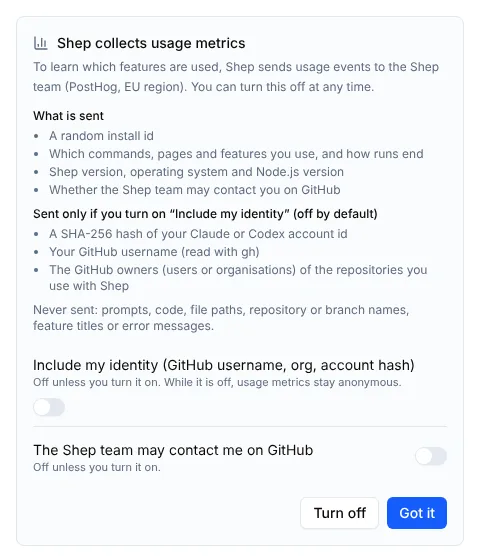
Your code, prompts, features and settings stay on your machine, in ~/.shep. The one thing Shep itself sends is a small set of usage events, so the Shep team can see which parts of Shep are used and whether runs end in merged pull requests.
Usage metrics are on by default, announced the first time you run Shep, and easy to turn off. Fields that identify you are opt-in: they’re sent only after you turn on Include my identity. This page lists everything that’s sent.
Your agents are separate: Claude Code, Codex, OpenRouter and the rest talk to their own providers under their own terms.
Turn it off
| How | Effect |
|---|---|
shep telemetry off | Off. Events not yet sent are deleted |
| Settings → Usage metrics → Send usage metrics | Same as above |
| Turn off on the first-run notice | Same as above |
DO_NOT_TRACK=1 or SHEP_TELEMETRY_DISABLED=1 | Off for every Shep process that sees the variable |
CI set (any value except 0 or false) | Always off |
Running under a test runner (VITEST, NODE_ENV=test) | Always off |
The environment always wins: with DO_NOT_TRACK=1 set, shep telemetry on can’t turn metrics back on.
Commands
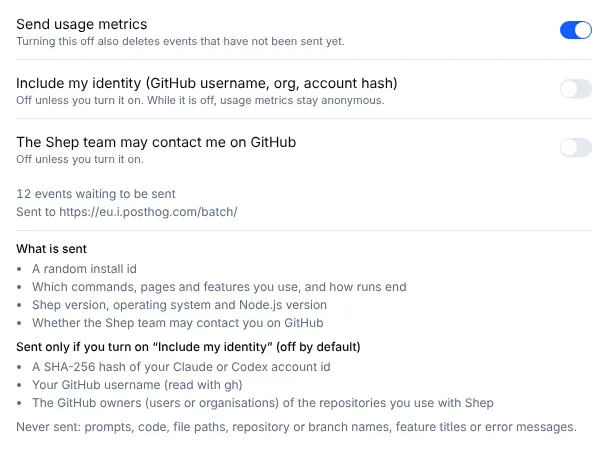
shep telemetry status          # on or off (and why), identity, contact, install id, queued events, destination
shep telemetry show            # print the exact request body the next send would post
shep telemetry off             # turn off and delete queued events
shep telemetry on              # turn back on
shep telemetry identity on     # include your identity fields (off by default)
shep telemetry identity off    # leave them out again, including from queued events
shep telemetry contact on      # allow the Shep team to contact you on GitHub
shep telemetry contact off
shep telemetry show replaces the project key with a placeholder, so you can paste its output anywhere.
The same switches are in Settings → Usage metrics:
What is sent
Every event carries:
| Field | Example | Notes |
|---|---|---|
distinct_id | random UUID | The install id, created on first run. Never derived from an account |
uuid | random UUID | Per event, so a retried send can be de-duplicated |
process | cli, daemon, worker | Which Shep process recorded it |
shepVersion, os, arch, nodeVersion | 1.252.2, darwin, arm64, 22.11.0 | |
contactConsent | false | Whether the Shep team may contact you on GitHub (off unless you allow it) |
$geoip_disable | true | Location lookup from your IP address is always off |
Only with Include my identity on
Identity is off by default. When you turn it on, events also carry:
| Field | Source |
|---|---|
agentAccountHash, agentAccountSource | A SHA-256 hash of your agent account id, read from the agent’s own login file (Claude Code: ~/.claude.json; Codex: ~/.codex/auth.json). The raw id never leaves your machine |
githubUsername | gh api user |
githubOwners | The GitHub users or organisations that own the repositories you added to Shep. Repository names are dropped |
Identity is attached when a batch is sent, so turning it off also covers events already queued.
Events
| Event | Properties | When |
|---|---|---|
install.heartbeat | agent type, names of enabled feature flags, repository count, active feature count | At most once a day |
cli.command | the command path, such as feat new, never its arguments | A CLI command runs |
web.area.viewed | the area and route template, such as /feature/[featureId] (never the id) | A web page is opened |
feature.created | build mode, agent type | A feature is created |
feature.run.finished | status, agent type, duration bucket (under-1m … over-4h) | A feature run ends |
pr.opened | build mode | Shep opens a PR for a feature (once per feature) |
pr.merged | build mode, whether it merged through a PR | A feature’s PR merges (once per feature) |
decision.answered | kind of question, where it was answered, how long it took (bucket), whether the recommended option was picked | Someone answers an agent’s question or gate |
decision.defaulted | kind, deadline bucket | An agent proceeds with its recommendation at the deadline |
onboarding.step | step, completed | Web onboarding |
error.unhandled | error class, a truncated hash of the top stack frame | Shep crashes |
harness.candidate.proposed | origin, component count and kinds, whether it was auto-adopted | Self-learning proposes a change |
harness.version.adopted | origin, component count, whether policy adopted it | A learned harness version is adopted |
harness.version.rejected | origin, whether a reason was given (never the reason) | A version is rejected |
harness.version.rolled-back | origin, whether the previous version was restored | A version is rolled back |
harness.refinement.finished | mode, status, counts | A self-learning refinement ends |
The harness.* events only occur when the experimental self-learning harness is on.
Never sent
Prompts, code, file paths, repository or branch names, feature titles, local ids, and error messages. Each event’s properties are declared as a fixed type in Shep’s source, so adding a content field to an event doesn’t compile.
How events are delivered
- Every Shep process writes events to a local queue in its SQLite database. Only the long-running server (
shep startorshep ui) sends them, about once a minute. - They go to Shep’s PostHog project in the EU region (
https://eu.i.posthog.com), in batches of 20, over a plainfetchwith no analytics SDK. - A failed batch is retried with backoff and dropped after five attempts. The queue keeps at most 5,000 events.
- When metrics are off, the queue is emptied at the next send.
shep telemetry statusshows where events go. If no project key is configured, it says so, and nothing is sent.
What’s next
- Privacy policy — how the Shep team handles data.
- Configuration — other settings and environment variables.
- FAQ — common questions about data and accounts.