Docs First and Autopilot
New. Three feature flags, all on by default: docsFirst, autopilot and factory. Turn one off in Settings → Feature flags or with shep settings flags disable <flag>. Docs first and autopilot do nothing in a space until you configure them there.
This page covers three per-space settings and views:
- Docs first — agents write the user-facing documentation while planning, build to it, and a change without docs waits for a person before merging.
- Autopilot — which steps of the other loops a space starts on its own, every hour.
- Factory status — what a space has in motion and what waits on people.
Docs first
shep space config acme --docs-first                          # docs/ and README.md
shep space config acme --docs-first --docs-paths docs/,CHANGES.md
Or tick Require docs first under Agent settings on the Spaces page. In a docs-first space:
- Planning. The agent writes or updates the user-facing documentation for the feature under the documentation paths first, as if it had shipped, and lists those files in the plan.
- Implementing. The agent treats that documentation as the contract. If the build has to differ, it changes the docs in the same change.
- Merging. Shep checks the changed files. If none is under the documentation paths, the run does not merge on its own, even when merges are automatic (
--allow-merge): the merge gate opens and says why. Approve it to merge anyway.
A path ending in / covers everything under it; any other path covers that one file. Paths are relative to the repository root; absolute paths and .. are refused. The defaults are docs/ and README.md.
shep space config acme --no-docs-first          # turn it off for the space
shep space config acme --clear docs-paths       # back to docs/ and README.md
Docs first applies to every feature run in the space’s repositories, including fixes started by the bug loop and autopilot. Turning the docsFirst flag off disables it everywhere at once.
Autopilot
The other loops each wait for a person to start them. Autopilot lets a space start some of them by itself, once an hour, within limits you set. Everything is off until you turn it on.
shep autopilot set --space acme --investigate --fix --budget 3
shep autopilot set --space acme --fill-line --project payments
shep autopilot show --space acme          # the policy and recent passes
shep autopilot run --space acme           # a pass now instead of waiting for the hour
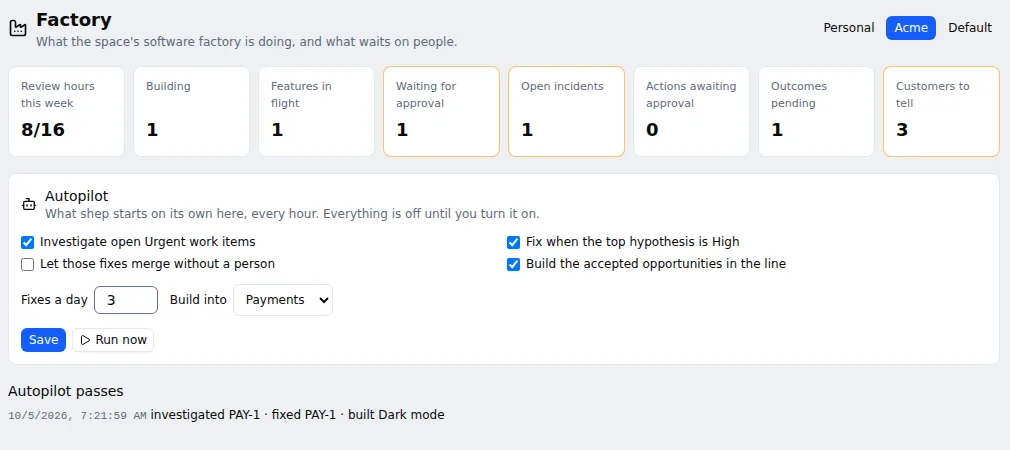
Or use the Autopilot form on the Factory page. A pass does, for each part that is on:
| Part | Option | What a pass does |
|---|---|---|
| Investigate | --investigate | Starts a bug investigation for open work items with Urgent priority that have none yet, in projects whose repository belongs to the space. At most two per pass |
| Fix | --fix | When an item’s latest investigation ranks its top hypothesis High confidence and no fix was started, starts the fix as a Fast-mode feature. At most --budget fixes in any 24 hours |
| Merge fixes | --merge-fixes | Lets those fixes merge without a person. Off by default: autopilot fixes approve the requirements and plan gates, and stop at the merge gate |
| Fill the line | --fill-line | Builds accepted opportunities inside the week’s line that aren’t building yet into the project named by --project (id or slug), as Build does on the Opportunities page |
| Option | Meaning |
|---|---|
--budget <n> | Most fixes autopilot starts in 24 hours, 0 to 20 (default 3) |
--project <project> / --clear-project | The project the line is built into; filling the line needs one |
--no-investigate, --no-fix, --no-merge-fixes, --no-fill-line | Turn a part off |
Limits that still hold for autopilot fixes:
- CI: with
--merge-fixes, a fix whose CI result isn’t verified still stops at the merge gate. See CI watch. - Docs first: in a docs-first space, a fix that changes no documentation stops at the merge gate.
- The space’s allowed agents and logins apply to investigations and fixes.
- Autopilot never runs incident actions. Those have their own
--auto-actionssetting.
Every pass is recorded with what it investigated, fixed and built, and what failed; one failure doesn’t stop the rest of the pass. The daemon (shep start, or shep ui while it runs) runs passes once an hour for every space whose autopilot has something on. An investigation can take many minutes, so shep autopilot run can too.
Try it without an agent account
Set the agent type to the built-in Demo agent (shep settings agent --agent dev). Investigations, discovery and incident triage then get canned answers built from what they are asked, so you can click through every loop locally before pointing it at real work. Switch back with shep settings agent when you’re done.
Factory status
shep factory status --space acmeOr open Factory in the sidebar (/factory). For one space it shows:
| Card | Meaning |
|---|---|
| Review hours this week | Hours used of the week’s review capacity; the terminal also shows bets in the line and waiting |
| Building | Opportunities being built |
| Features in flight | Features in the space’s repositories that haven’t finished |
| Waiting for approval | Those of them stopped at a gate for a person (a plan to review, a fix waiting to merge) |
| Open incidents | Incidents not resolved |
| Actions awaiting approval | Restarts, rollbacks and scales triage proposed |
| Outcomes pending | Shipped opportunities not judged yet |
| Customers to tell | Customers behind shipped opportunities not told yet |
Below the cards are the Autopilot form and the list of recent passes. Each card opens the page behind it.