Agent Activity & States
For any feature, Shep can tell you one thing at a glance: is its agent working, blocked on you, waiting, done, or failed, and why. The same answer appears on the web’s Agent activity page, in a feature’s drawer, in shep feat status, in the terminal console, and to other tools over MCP and A2A. It is worked out from the same data everywhere, so the surfaces never disagree.
The five states
| State | Meaning |
|---|---|
| working | An agent is executing |
| blocked | Someone has to act: an approval gate, an agent question, or a review. Shown as Needs you in the web UI |
| waiting | Not started: queued for a slot, deferred, or waiting on a parent feature |
| done | Finished, or archived |
| failed | The run failed, was interrupted or cancelled, or its process died |
An open agent question makes a working or waiting feature blocked, with reason agent-question.
Reasons
Each state comes with a reason, the rule that decided it. shep feat status prints the reason as a sentence; --json and the APIs give the key.
| Reason | Shown as | State |
|---|---|---|
agent-running | The agent is working | working |
in-progress | In progress | working |
approval-gate | Waiting for your approval | blocked |
agent-question | The agent asked a question | blocked |
awaiting-review | Its pull request waits for your review | blocked |
plan-task-in-review | A plan task waits for your review | blocked |
queued-for-capacity | Queued until a slot under the parallel-feature limit frees up | waiting |
deferred | Deferred: no agent has started yet | waiting |
waiting-on-parent | Waiting for its parent feature to finish | waiting |
run-completed | Finished | done |
maintained | Finished; in maintenance | done |
plan-tasks-done | Every plan task is done | done |
archived | Archived | done |
deleting | Being deleted | done |
run-failed | The run failed | failed |
run-interrupted | The run was interrupted | failed |
run-cancelled | The run was cancelled | failed |
process-died | The agent process stopped unexpectedly | failed |
queued-for-capacity comes from the parallel-feature limit, deferred from shep feat new --pending, and waiting-on-parent from shep feat new --parent. A failed feature is recovered with shep feat resume <id>, Retry in the drawer, R in the terminal console, or shep fleet retry --failed for all of them.
In the web UI
Agent activity in the sidebar (/activity) lists every feature’s agent with its state, why, what the agent is asking (if anything), the repository and phase, and a link to the next step, such as Review and approve or Open to resume. Chips at the top count each state. Finished features are hidden until you turn on Show finished. The sidebar link carries a badge with the number of blocked features.
A feature’s drawer opens on its Overview tab with an Agent status card: the state, why, what the agent asks, the phase, and what to do next.
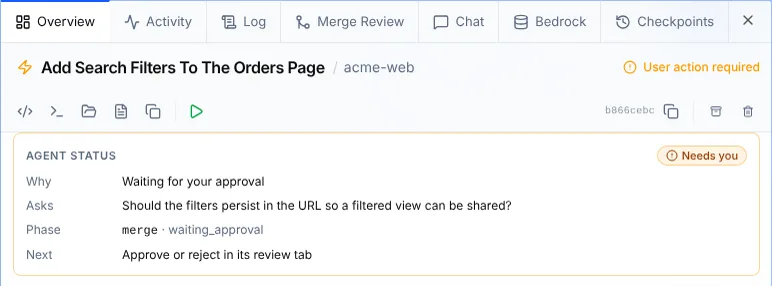
Notify me
On the Agent status card, Notify me watches the feature for you. When it needs you, finishes or fails, you get a toast and a browser notification. Stop ends the watch.
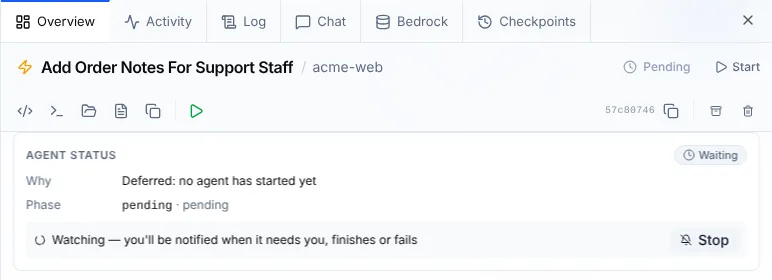
Approve, reject and answer stay where they are: the drawer’s action bar and the Agent Questions inbox, which the next-step links open.
From the CLI
shep feat status
shep feat status <id>
shep feat status <id> --json
Add A Login Page With Email And Password blocked
Why Waiting for your approval
Phase merge
Run waiting_approval
ID 7a8252ce-8c09-413a-b1dc-e22e7a082e32
Next shep feat approve 7a8252ce | shep feat reject 7a8252ce<id> is a feature id or id prefix. When the agent is asking something, an Asks line shows the question; a failed run shows its Error, and a feature with a PR shows the PR. With --json you get the fields for scripts:
$ shep feat status 7a8252ce --json | jq '{state, reason, phase, actions, version}'
{
  "state": "blocked",
  "reason": "approval-gate",
  "phase": "merge",
  "actions": ["approve", "reject"],
  "version": 1793204235588
}
version increases whenever the activity changes. If you poll, compare the state too: answering a question can lower the version once between two separate reads.
To list every feature, use shep feat ls, the Agent activity page, or the terminal console.
shep feat wait
shep feat wait blocks until a feature’s agent needs someone, finishes or fails, and then prints its status. Use it in scripts, or to hand control back to another agent at the right moment.
shep feat wait <id>                                  # until blocked, done or failed
shep feat wait <id> --until done --timeout 3600      # only done, give up after an hour
shep feat wait <id> --until working,blocked --json| Option | Meaning |
|---|---|
--until <states> | Comma-separated states to wait for: working, blocked, waiting, done, failed. Default blocked,done,failed |
--timeout <seconds> | Give up after this many seconds. Without it, waits until a state is reached or you press ctrl+c |
--json | Print the result as JSON (outcome plus the activity) |
The exit code tells a script how the wait ended:
| Exit code | Outcome |
|---|---|
0 | Reached one of the states |
1 | No feature with that id or prefix |
2 | Timed out; the output says the state it’s still in |
3 | The id prefix matches more than one feature |
130 | Interrupted with ctrl+c |
shep feat new "Add rate limiting to the public API" --repo .
# … copy the id it prints …
if shep feat wait 7a82 --timeout 1800; then
  shep feat status 7a82
fi
For other tools
- MCP (
shep mcp):get_agent_activity,wait_for_agent_activity(60 seconds by default, at most 10 minutes per call), plusdecide_feature_gateandanswer_agent_questionto act on what you see. See MCP server. - A2A: each feature is an A2A task whose state follows its activity. See A2A.
- HTTP: the web daemon serves
GET /api/agent-activityandGET /api/agent-activity/wait, which the web UI uses. - Herdr: when
shep tuiruns in a Herdr pane, it reports blocked (with “needs you: N”), working or idle to Herdr. See Terminal console.
See also
- Decisions & agent questions: what blocked is waiting for, and every place to answer it.
- Features & lifecycle: the lifecycle phases behind these states.
- Running many features