Spaces and Product Lines
New. Behind the spaces feature flag (on by default). Turn it off in Settings → Feature flags or with shep settings flags disable spaces. Settings you already saved on a space keep applying to runs while the flag is off.
A space keeps one body of work apart from another: a client, your employer, your side projects. A product line is a group of repositories inside a space, such as Acme’s payments services.
Spaces decide two things:
- How far knowledge travels. Project memory, Notion knowledge, signals, opportunities and incidents belong to a space. Nothing written in one space is read by agents in another.
- Who the agents are. A space can give its feature runs their own Claude login, GitHub account, git author, AWS profile and list of allowed agents.
A fresh install has one space, Default. Until you add another, everything lands there and nothing changes.
Where a repository lands
Every repository belongs to exactly one space. Shep decides which, in this order:
- A pin. You assigned this repository to a space with
shep space assignor Pin to space… on the Spaces page. - A rule. The most specific matching rule wins. A rule is a folder prefix (
~/work/acme) or a git remote pattern (github.com/acme/*). In remote patterns*matches within one segment and**spans segments. Equally specific rules are ordered by priority (lower wins, default 100). - The default space. Everything else.
A rule can also name a product line that matching repositories join.
Set it up from the terminal
shep space new Acme -d "Client work for Acme" -c "#3456c4"
shep space line new acme Payments
shep space rule add acme "github.com/acme/*"
shep space rule add acme "github.com/acme/pay-*" -l payments
shep space show ~/work/acme/pay-api
shep space show prints the space, the product line and why:
  Space         Acme
  Product line  Payments
  Because       matched Remote rule github.com/acme/pay-*
Spaces, lines and rules are addressed by name, slug or id. The slug is printed when you create one (Acme → acme).
| Command | Does |
|---|---|
shep space ls | Every space with its product lines, repository count and memory count |
shep space show [path] | Which space and product line a repository is in, and why (current directory if omitted) |
shep space new <name> [-d <text>] [-c <#hex>] [--default] | Create a space; --default makes it the default |
shep space edit <space> [-n <name>] [-d <text>] [-c <#hex>] | Rename it or change its description or colour |
shep space default <space> | Make it the space unmatched repositories land in |
shep space rm <space> | Delete it with its rules, pins and product lines |
shep space line new <space> <name> [-d <text>] | Add a product line |
shep space line rm <space> <line> | Remove a product line; its repositories stay in the space |
shep space rule add <space> <pattern> [--remote] [-l <line>] [-p <n>] | Add a rule. Shep tells a path from a remote pattern by its shape; --remote forces remote |
shep space rule ls [space] | List rules |
shep space rule rm <id> | Remove a rule |
shep space assign <space> [path] [-l <line>] | Pin a repository, overriding every rule |
shep space unassign [path] | Remove the pin so the rules apply again |
shep space config <space> [options] | Show or change how agents run in the space (below) |
Set it up in the browser
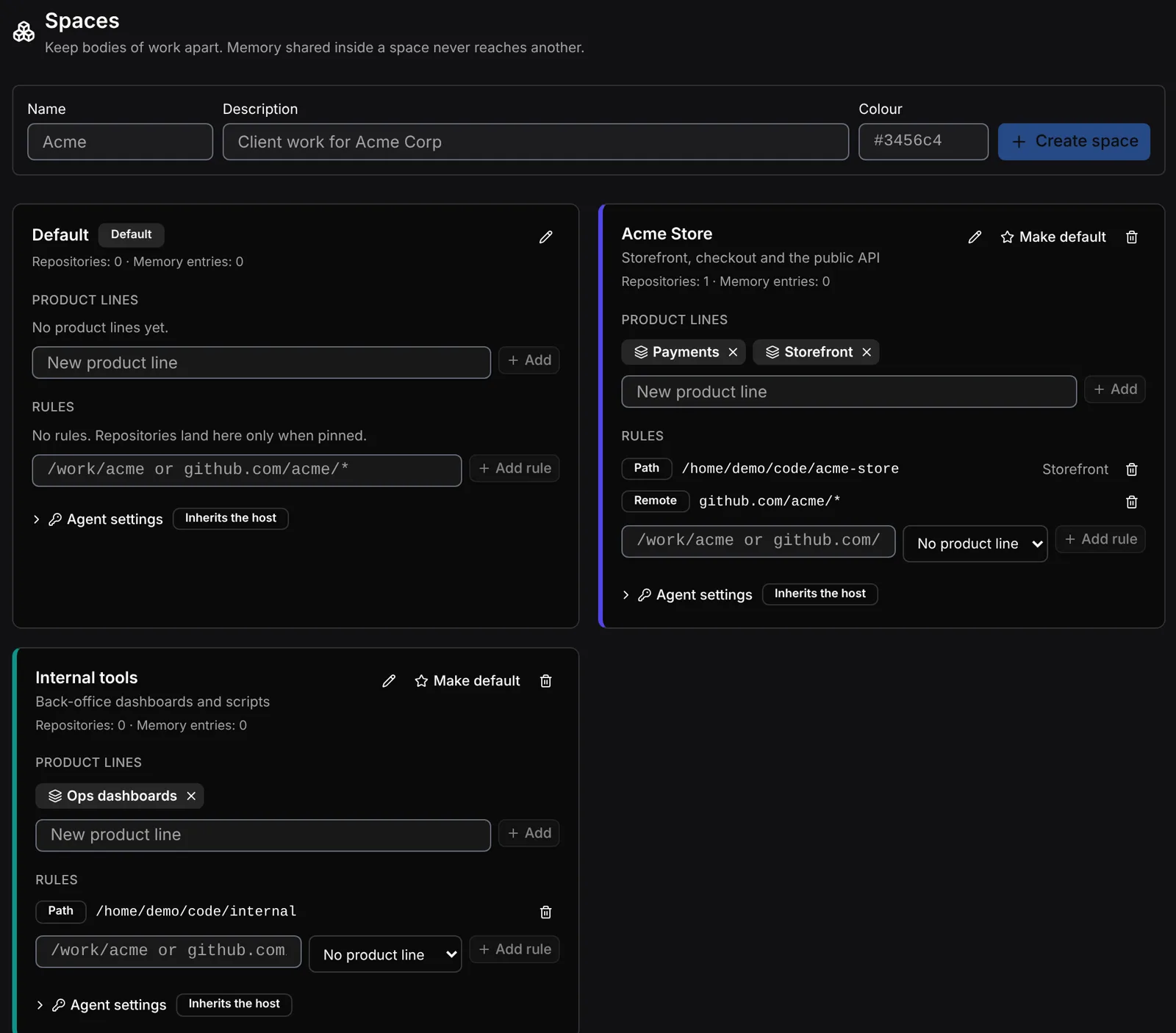
Open Spaces in the sidebar (/spaces).
- Create a space with a name and, optionally, a description and colour.
- Add product lines to it.
- Add rules: type a folder or a remote pattern and optionally pick the product line.
- Check the Repositories table. It shows each repository’s space, product line and the reason (Pinned, Rule or Default space). Use Pin to space… to override the rules for one repository.
Memory reach
Shep’s agents write lessons into project memory after merged features. Each entry has a reach, which you change on the Project Memory page with Change who sees this:
| Reach | Who reads it |
|---|---|
| This repository only | Agents working in the repository that learned it (the default) |
| Its product line | Every repository in the same product line |
| Its whole space | Every repository in the same space |
No reach crosses a space. Moving a repository to another space takes its repository-only entries with it; entries it shared stay where they were written.
Per-space logins, identity and agents
Anything you leave empty inherits your machine’s setup. Shep never stores a password or token for this: you give each tool its own config directory and log in there once.
# A separate Claude login for Acme work
CLAUDE_CONFIG_DIR=~/.claude-acme claude          # log in, then exit

# A separate GitHub account for Acme work
GH_CONFIG_DIR=~/.config/gh-acme gh auth login

shep space config acme \
  --claude-config-dir ~/.claude-acme \
  --gh-config-dir ~/.config/gh-acme \
  --git-name "Ada Lovelace" --git-email ada@acme.com \
  --agents claude-code,codex-cli
From then on every feature run in an Acme repository — its agent and every git and gh command it runs, including the pull request it opens — uses those logins and that identity. Chat sessions about a feature, bug investigations, discovery and incident triage in the space use them too.
| Option | Sets for agent processes |
|---|---|
--claude-config-dir <dir> | CLAUDE_CONFIG_DIR, and removes ANTHROPIC_API_KEY, ANTHROPIC_AUTH_TOKEN, CLAUDE_CODE_OAUTH_TOKEN so they don’t override it |
--gh-config-dir <dir> | GH_CONFIG_DIR, and removes GH_TOKEN, GITHUB_TOKEN, GH_ENTERPRISE_TOKEN, GITHUB_ENTERPRISE_TOKEN |
--git-name <name> | GIT_AUTHOR_NAME and GIT_COMMITTER_NAME |
--git-email <email> | GIT_AUTHOR_EMAIL and GIT_COMMITTER_EMAIL |
--aws-profile <name> | AWS_PROFILE |
--bedrock / --no-bedrock | Sets CLAUDE_CODE_USE_BEDROCK=1 / removes it, whatever the host sets |
--agents <list> | Comma-separated agent types the space allows (claude-code, codex-cli, cursor, gemini-cli, …). Empty allows every agent |
--pr-comments off|mention|all | Which review comments on Shep’s pull requests are answered without asking (default mention, i.e. comments containing #shep). See PR comments |
--resolve-threads / --no-resolve-threads | Resolve a review thread after changing code for it |
--auto-actions <list> | Runtime actions run on incidents without approval: restart, rollback, scale. See Incidents |
--docs-first / --no-docs-first | Docs-first mode. See Docs first |
--docs-paths <list> | Documentation paths for docs first (default docs/,README.md) |
--clear <fields...> | Return fields to “inherit”: claude-config-dir, gh-config-dir, git-name, git-email, aws-profile, bedrock, agents, pr-comments, resolve-threads, auto-actions, docs-first, docs-paths |
shep space config acme with no options shows the settings and exactly which variables a run gets (Sets / Removes).
If a space allows only some agents, a run with another agent stops before it starts and says why. Change the run’s agent or the space’s allowed agents.
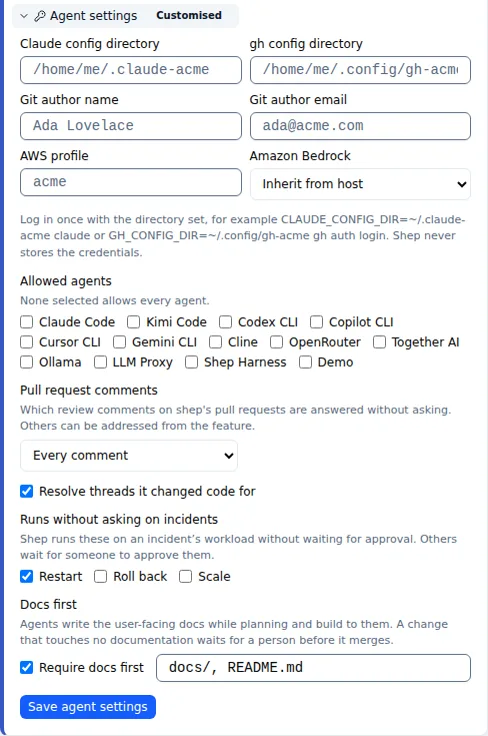
In the browser, expand Agent settings on the space’s card on the Spaces page. The card shows Customised or Inherits the host.
Things to know
- Deleting is guarded. Shep refuses to delete a space that still holds memory, or a product line that memory is shared with, and says how many entries are in the way. The default space can’t be deleted; make another space the default first.
- Not everything uses the space login. The Shep web server’s own GitHub calls, such as listing repositories to import, use your machine’s login. Claude transcripts for a space with its own Claude config directory live in that directory, so the web UI’s session list shows only the default login’s transcripts.
- Entries from before spaces. Memory entries that were “organization-wide” now read as space-wide inside the space they were written in, which on an upgraded install is the default space.
See also
- Software factory overview
- Trackers and team knowledge — connections belong to a space
- PR comments
- Agents