Decisions & Agent Questions
Most of the time Shep’s agents work without you. The moments when they do need you, an approval gate, a question about requirements, a choice an agent can’t make alone, are all the same thing in Shep: a decision. Every decision has options, a recommended answer that’s already selected, and is shown the same way wherever you are, so answering usually takes one keystroke.
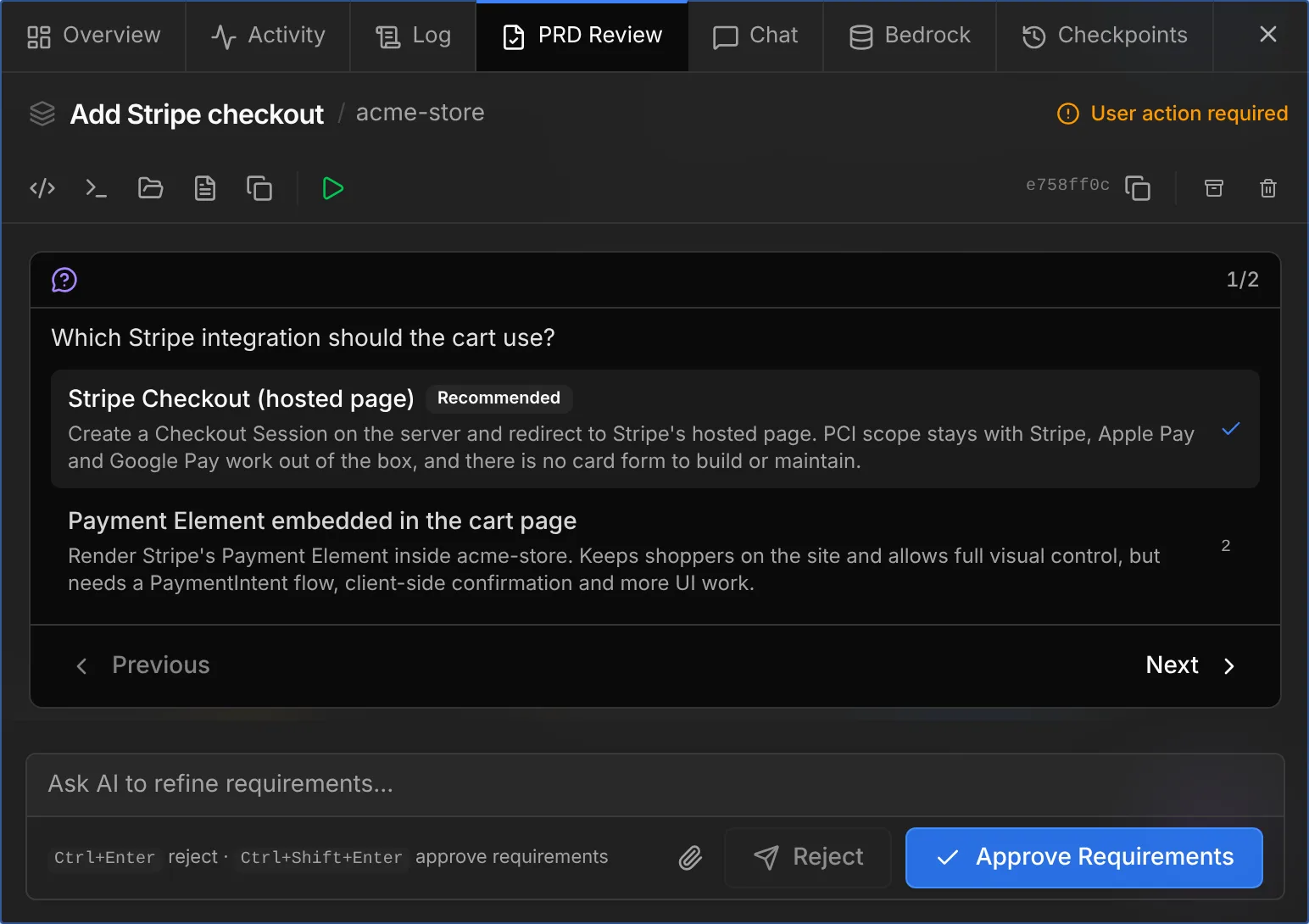
Where decisions come from
| Kind | Raised when |
|---|---|
| Approval gate | A feature’s run stops at a gate: requirements (PRD), plan, or merge. Options: Approve or Reject; a typed note on Reject becomes the feedback |
| Requirements questions | In spec-driven mode, the requirements phase asks product questions before writing the spec |
| Chat question | An agent you’re chatting with asks you something (Claude Code’s AskUserQuestion, or Cursor’s equivalent) |
| Agent ask | A background feature agent is blocked on a choice it can’t make by reading the code, and asks through Shep’s ask_decision tool |
| Harness change | A learned-harness change waits to be adopted or rejected (experimental self-learning harness only) |
Anatomy of a decision
- Questions. A decision holds one or more questions, answered together. With several, you page through them (
1/2, Next, Previous, Submit). - Options. Up to nine per question, each with a label and a one-line description. Some options carry a preview (code, a mockup, a diff) shown when the option is focused.
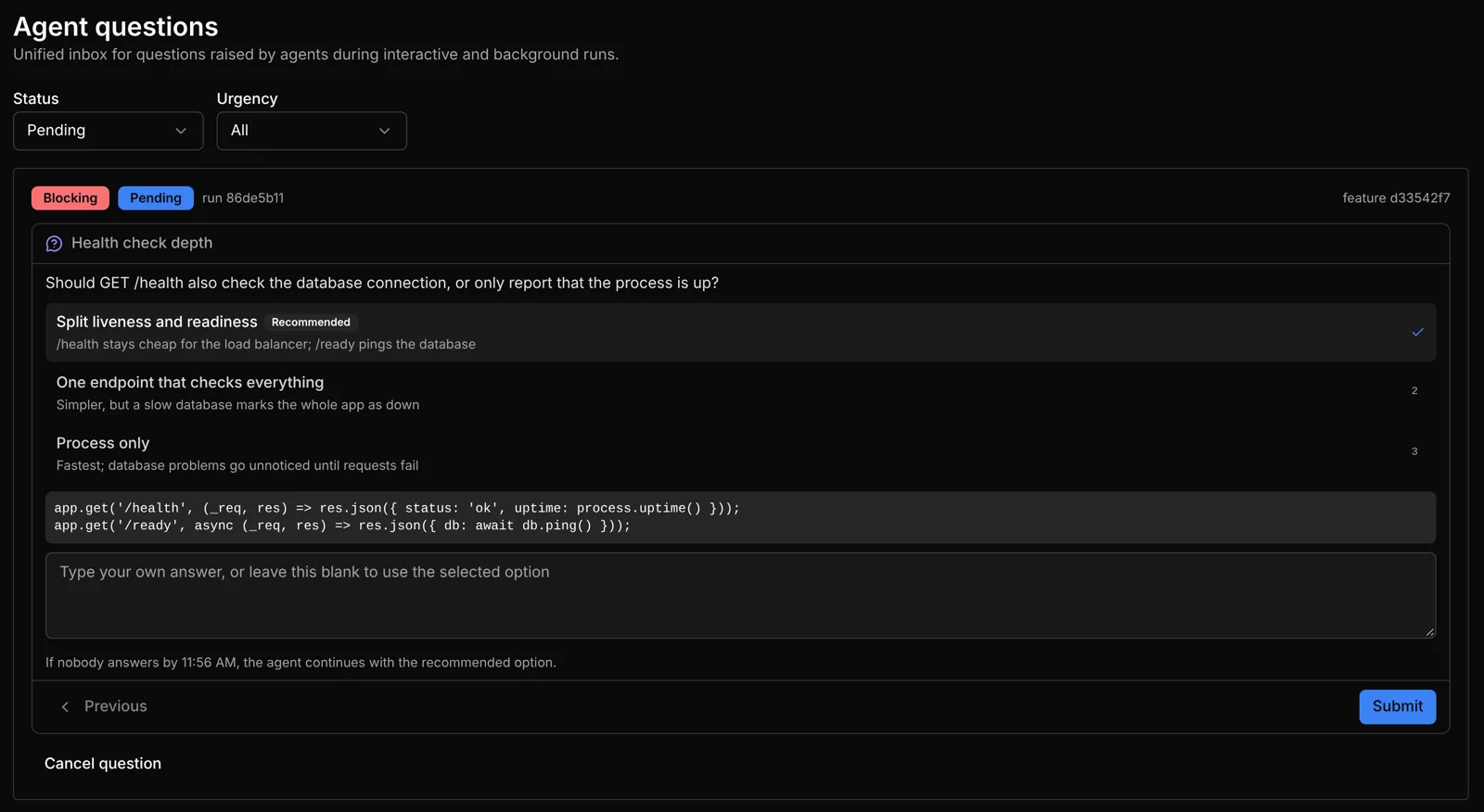
- Recommended option. The option the agent would pick, marked Recommended and preselected. A deadline falls back to it.
- Single or multi-select. Single-select questions advance as soon as you pick. Multi-select questions toggle.
- Your own answer. The text box under the options takes a free-form answer. When it isn’t empty, your text wins over the selected option.
- Deadline. Optional. Shown under the options: “If nobody answers by 11:56 AM, the agent continues with the recommended option.”
Once answered, a decision collapses to an Answered questions row with what was chosen and by whom. A decision whose agent has gone away (for example, a chat session that ended) is still shown, but marked as no longer answerable.
Keyboard
| Key | Action |
|---|---|
1–9 | Pick that option |
n / N | Next / previous question |
| Typing | Writes your own answer |
Deadlines
A background agent that asks with ask_decision must offer 2–9 options and mark exactly one as recommended. It can set its own deadline; otherwise the default applies.
Set the default under Settings → Workflow → Question deadline. It is 30 minutes by default, and can be anything from 1 minute to 24 hours (workflow.decisionDefaultTimeoutMinutes).
When the deadline passes, the question is closed with the recommended answer, the agent carries on with it, and the feature’s activity log records that it proceeded with the recommended option. If the question is cancelled, or questions are turned off, the agent also proceeds with its recommendation.
Approval gates and chat questions have no deadline. A gate waits for you (or for your supervisor) for as long as it takes.
Background agents can ask only when the collaboration feature flag is on (the default) and the agent accepts an MCP configuration for its run. Today that is Claude Code. With other agents, or with the flag off, background runs don’t ask; they make the call themselves and you review it at the next gate.
Where to answer
The same decision shows up everywhere at once, and whichever surface answers first settles it everywhere.
| Surface | How |
|---|---|
| Chat | Inline in the turn that asked. See Chat |
| Feature drawer | Gates in their review tab (with the review document and action bar); requirements questions as pages of the questionnaire |
| Agent Questions inbox | Sidebar → Collaboration → Agent Questions (/agent-questions, shown while the collaboration flag is on, the default). Every pending question across features, filterable by status and urgency, with Cancel question |
| Agent activity | /activity and the drawer’s Agent status card say what the agent asks and link to where to answer. See Agent activity |
| Terminal console | a / r for gates; o to answer a chat question with a digit; d for harness changes. See Terminal console |
| CLI | shep feat approve / shep feat reject for gates; shep agent questions for everything else (below) |
| MCP and A2A | decide_feature_gate and answer_agent_question on shep mcp; a reply to the task over A2A |
Pending decisions also raise notifications (in the app, in the browser and on the desktop, per your notification settings) and appear in the terminal console’s NEEDS YOU strip.
From the CLI
shep agent questions ls --app <scope> --status pending
shep agent questions answer <question-id> --app <scope>
shep agent questions answer <question-id> --app <scope> --answer "Online, nullable column"
shep agent questions cancel <question-id> --app <scope> --reason "No longer needed"
--app is required. It is the application id for an app, or the repository’s absolute path for a plain repository. Add --feature <id> to ls to narrow it to one feature. ls prints each question readably, with a short id; answer and cancel take the full question id.
Without --answer, answer shows the decision in your terminal with the recommended option preselected. With --answer, the text is matched to an option by its id or label; anything else is recorded as your own answer when the question allows it. On a gate, own text means reject with that feedback.
Answering for you
With a supervisor configured, gate decisions can be answered by it within the rules you set. Your own answer always wins over the supervisor’s.
See also
- Agent activity & states: the blocked state and its reasons.
- Supervisor & guardrails
- Chat
- Running many features: approve gates in batches.