Incidents
New. Behind the incidents feature flag (on by default). Turn it off in Settings → Feature flags or with shep settings flags disable incidents; that also turns off POST /api/alerts.
An incident is a production problem recorded in a space. Shep keeps its timeline, asks the space’s agent what is likely wrong, and can restart, roll back or scale the Kubernetes deployment behind it — after you approve, or without asking for the actions you allow. When it’s over, you resolve it with a postmortem.
Every incident is also recorded as an Incident signal (urgent for Critical and Major), so recurring outages compete for review time like any other evidence.
Before you start
- Recording and triage need nothing extra. An incident without a workload is a record: you can triage it and keep its timeline, but runtime actions are off.
- Runtime actions need
kubectlon the machine running Shep, with a kubeconfig that can reach the cluster. Shep runskubectlwith that kubeconfig and the context you name (or your current context). It reads deployment status, events and logs during triage, and runsrollout restart,rollout undoorscalefor actions. - Only Kubernetes deployments are supported as workloads.
Open an incident
shep incident open "Checkout 5xx" --space acme --severity critical \
--workload checkout --namespace shop --context prod| Option | Meaning |
|---|---|
--severity | critical, major (default) or minor |
-d, --detail, --url | What is happening; a link to the alert or dashboard |
-w, --workload | The Kubernetes deployment it concerns |
-n, --namespace | Its namespace (default default) |
--context | Its kubeconfig context (default: your current one) |
Or use the form at the top of the Incidents page (/incidents).
Let alerts open incidents
A monitoring tool can open incidents with a space feedback key — the same key that posts customer feedback. Create one with shep feedback key create --space acme --name Grafana.
curl -X POST http://localhost:4050/api/alerts \
  -H "Authorization: Bearer shep_fb_…" \
  -H "Content-Type: application/json" \
  -d '{
        "title": "Checkout 5xx above 5%",
        "severity": "Critical",
        "detail": "Error rate on POST /checkout rose to 7% at 09:58.",
        "url": "https://grafana.acme.com/d/checkout",
        "externalId": "grafana-alert-812",
        "namespace": "shop",
        "workload": "checkout"
}'| Field | Required | Meaning |
|---|---|---|
title | yes | What is wrong |
severity | no | Critical, Major (default) or Minor |
detail | no | More text |
url | no | An http(s) link to the alert or dashboard |
externalId | no | The alert’s id. While that incident is unresolved, a repeat adds a note instead of opening a new one |
context, namespace, workload | no | Where the workload runs |
Responses: 201 opened, 200 repeat of an unresolved incident, 400 bad payload, 401 unknown or revoked key, 413 body over 16 KB. The body is { "id": "<incident id>", "duplicate": false }.
As with feedback, the endpoint is on your machine’s Shep server; a hosted monitoring tool needs a tunnel or reverse proxy you set up.
Triage
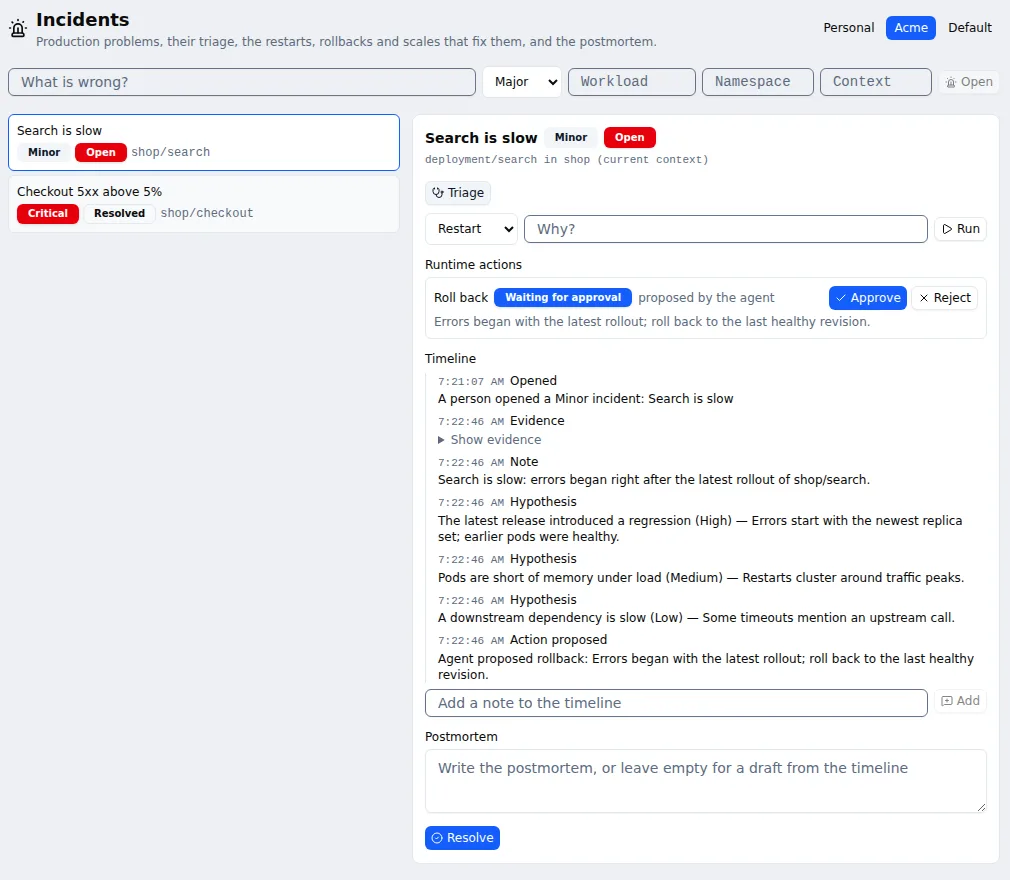
shep incident triage <incident>Or press Triage. Shep reads the deployment’s status, recent events and logs with kubectl and records them as evidence. Then it asks the space’s agent — with no tools and nothing outside this incident — for a summary, up to three causes ranked by confidence, and at most one runtime action. The causes and the proposed action go on the timeline.
--agent <type> picks another agent; the space’s allowed agents and logins apply.
Act
An action the agent proposes waits for a person:
shep incident show <incident>                          # timeline and action ids
shep incident approve <action>                         # runs at once
shep incident reject <action> --reason "deploy is fine"
Or use Approve / Reject on the page. You can also act yourself; an action you ask for runs at once:
shep incident act <incident> rollback --reason "errors began with 4.12.0"
shep incident act <incident> scale --replicas 6
shep incident act <incident> restart
After an action runs, Shep waits up to three minutes for the rollout to become ready and records Recovered or Not recovered. The first recovery marks an open incident Mitigated.
Let Shep act without asking
shep space config acme --auto-actions restartActions in the list run as soon as triage proposes them. In the browser, tick them under Runs without asking on incidents in the space’s Agent settings. shep space config acme --clear auto-actions goes back to always asking.
Rollbacks and scales change what runs in production. Allow them without approval only where that is safe.
Autopilot never runs incident actions; this setting is the only way they run without a person.
Resolve
shep incident note <incident> "Paged the DBA"
shep incident resolve <incident>
shep incident resolve <incident> --postmortem "$(cat postmortem.md)"
Resolving without --postmortem writes a draft from the timeline and actions: the timeline, each action with its result, and follow-ups to fill in. On the page, write the postmortem in the Postmortem box or leave it empty for the draft, then press Resolve.
Statuses: Open → Mitigated → Resolved.
| Command | Does |
|---|---|
shep incident open <title> [options] | Open an incident |
shep incident ls [--open] | List incidents, newest first; --open for unresolved only |
shep incident show <incident> | Timeline and actions |
shep incident note <incident> <text> | Add a note to the timeline |
shep incident triage <incident> [--agent <type>] | Read the workload and ask an agent for causes and one action |
shep incident act <incident> <restart|rollback|scale> [-r <replicas>] [--reason <text>] | Run an action now |
shep incident approve <action> / reject <action> [--reason <text>] | Decide on a proposed action |
shep incident resolve <incident> [--postmortem <markdown>] | Resolve it |
Good to know
- Workload, namespace and context names are validated before they reach
kubectland are never read as flags. Scale accepts up to 100 replicas. kubectlruns without a shell, on the machine running Shep, as whoever that kubeconfig authenticates.
See also
- Opportunities, feedback and outcomes
- Spaces
- Factory status — open incidents and actions awaiting approval